
Ad Guides · Restaurants, Cafés & Bakeries × Facebook
Facebook ads for restaurants, cafés and bakeries
The objective, the offers, the buttons that replace a website and the contact details that get a dinner into Ads Manager — for a restaurant, café or bakery on Facebook, with every platform claim sourced and dated.
Open a restaurant's Ads Manager after a good month and the dinners will not be in it. They should not be. The dinner the ad sold was eaten at a table and paid for by card, and nothing about it (no email address, no phone number, no page view) ever reached Meta. A café's sale is the same, only faster: across a counter, by tap. The platform is not late to these sales. It is watching a screen, and they did not happen on one.
So the account splits in two, along the line of what Meta can see. The table half is bought as reach inside a radius, with a cap on how often each person sees you, and it mostly finishes with a button instead of a website: Get directions or Call now. You judge it on your own till. Meta has already filed it there. It closed its store-traffic objective to new campaigns, moved its store location features into Awareness, and in Ads Manager offers the Get directions button under Awareness and no other objective.
The screen half is everything a restaurant sells that leaves a trace, and there is more of it than it first looks: a pickup order, a coffee club, a holiday pre-order, a gift card, a catering inquiry, a cake order, an event response, a phone call that lasted a minute.
Between the two halves there is a bridge, and a restaurant already owns it: the contact details guests hand over on a screen before they eat. Meta can match an in-store sale to a person only on details like an email, a phone number or a loyalty ID, and card numbers are not on its list. But the waitlist that texts when your table is ready, the reservation and the club each collect one. Upload the parties you seated, and the ones Meta can match to someone who saw an ad appear in Ads Manager as offline conversions. That count will not prove the ads worked, because if your ads reach most of your neighbourhood, most diners will have seen one whether or not it brought them in. It gives you a record, an audience of people who have eaten your food, and a way to count first visits. The till, read in weeks with and without ads, is the closest you will get to whether the ads caused anything. You need both.
What follows is a Facebook ad strategy for a restaurant, café or bakery: which of the six objectives to buy, which offers to advertise and the argument for each, why one radius is the wrong number of radii, where each click should land and when there should be no click at all, how to work out a budget from your own neighbourhood, and how to count the dinners Meta cannot see. The platform claims are footnoted at the bottom and dated.
The ads on this page are real output rather than mockups drawn for the argument. All ten from the restaurant Facebook examples page appear in the offer table and seven are shown in full, published exactly as generated for restaurants that do not exist. Every price is invented (a $30 coffee club, $41.50 against $58.20, $34 pies) and marks where your own number goes. Several went wrong in ways this page uses: food nobody briefed, wine nobody asked for, a break-even computed two ways in one run, and a grid of reviews from people who do not exist.
Two things this page is not. It is not legal advice: the alcohol, allergen and review rules below are United States rules (the hiring limits apply in Canada too), they are the floor, and your state, city or country adds its own. And it is not a benchmark report. There are no cost-per-cover figures here, because the only useful version of that number comes from your own till, and the budget section shows you how to get it.
Generate Facebook ads for your restaurant, café or bakery
Paste your site and best-in-slot reads it the way the invented restaurants above were read (menu, hours, location, what you are known for), then writes the concepts, renders the images and drafts the copy. Check every dish it shows against your menu. Free to start, no card.
What you are actually buying by choosing Facebook
On Facebook a restaurant is a set of objects Meta can sell ads against: an address, your own phone number, a calendar of events and, for a group, a family of location Pages. Each one has its own ad mechanism, and that is the difference this platform makes for the trade.
The address becomes a button. Meta's local-ad example, written for a store, runs under Awareness with Reach as the performance goal (the thing Meta's delivery system optimises for; here, the number of different people who see the ad) and puts a Get directions button on it, linked to the business's coordinates, so that tapping it presents the location "with a map and directions". Meta's own list of Ads Manager buttons offers Get directions under the Awareness objective and under none of the others. Get directions exists only in the objective this page recommends for dine-in.
Your phone becomes a destination, and for a bakery taking a cake order or a restaurant taking a booking, the call is the sale. Call ads (click-to-call) run only on mobile placements: Facebook Feed, Marketplace, Reels and Stories, and Instagram's feed and Stories. Under Traffic, Engagement, Leads and Sales they optimise for calls lasting sixty seconds. Under Awareness they optimise for the goal you picked, and the button rides along. Ads Manager reports calls placed, twenty-second calls, sixty-second calls and callback requests, which are messages people send through the ad's Send message button asking you to ring back. That last metric matters to a trade whose phone rings loudest while nobody can answer it.
The calendar becomes an objective. A Facebook event is an object Meta will promote directly: the Engagement objective, the event itself as the destination, optimised for event responses. A restaurant produces dated events all year (a supper club, a quiz night, a Thanksgiving seating, a New Year's Eve that sells out or does not), and each is an ad whose job is "come on Thursday".
The branches become a set, and a single restaurant can skip this paragraph. A group whose Page has location Pages under it can build what the Marketing API calls a place page set from the parent Page and point an ad's creative at it. The field description refers to a "Local Awareness guide" that we could not reach when this page was checked, so confirm what it offers in Ads Manager before planning around it.
Under all four sits the audience. Pew's November 2025 survey puts Facebook at 71% of American adults against about half for Instagram. That is a national figure, not your street, but it is why the budget section below can treat your radius as a population to reach rather than a slice to find.
Which objective to buy
Ads Manager offers six objectives: Awareness, Traffic, Engagement, Leads, App promotion and Sales. The objective you pick is an instruction about whom Meta shows the ad to, so pick it by asking where the sale actually happens. At a table or across a counter: Awareness, because nothing there reaches Meta to optimise for. On a page you own: Sales, because a purchase there is a real event with a real value. In a conversation about a date and a headcount: Leads. At a Facebook event: Engagement, optimised for event responses. On a page the reader has to see before they will come: Traffic. Nearly every restaurant ad fits one of those five sentences.
Two choices look reasonable and are not. Sales pointed at a dine-in offer asks Meta to find people who will complete a purchase on a page where no purchase ever happens, so it has nothing to learn from and will report nothing while it tries. And boosting a post of tonight's special is the quickest ad there is, but most of what this page relies on (a Reach goal with a cap, more than one radius, a 21+ split, exclusions, a Get directions button) lives in Ads Manager. When the Boost screen does not offer the setting you need, build the ad there.
- AwarenessDefault
For every meal eaten at your table or bought across your counter. Choose Reach as the performance goal, because only Reach and ThruPlay accept a frequency cap, set the cap per offer, and add Get directions or Call now so the ad finishes without a website. Judge it on reach, frequency and your till, never on conversions.
- SalesSometimes
On a page you own that carries the Meta pixel, the snippet that reports a purchase back to Meta: pickup through your own online ordering, a club, a pre-order, a gift card. Never a delivery-app listing. Meta's delivery system wants about fifty purchases a week per ad set, so keep Sales to as few ad sets as your volume can feed.
- LeadsSometimes
In a conversation about a date and a headcount: catering, private dining and custom cake orders. An Instant Form, Meta's own lead form, can ask both. Leads can also send people to a phone call or into Messenger.
- EngagementSometimes
At a Facebook event: anything with a date, with the event as the destination and event responses as the goal. Outside events and call ads, it mostly buys interaction with the post, which fills no tables.
- TrafficSometimes
On a page the reader has to see before they will come: the waitlist join page, a booking page, a separate gluten-free kitchen, a set menu with its price. Optimise for landing page views rather than link clicks, so Meta looks for people who wait for the page to load.
- App promotionNo
Unless you are a chain with your own ordering app, paying for a stranger to install an app so they can order from one restaurant is a long way round to a menu. Send them to your ordering page.
What to advertise, and the argument that wins it
The losing restaurant account runs one photograph of tonight's special, boosted to everyone within ten miles, every week. It tells a neighbour that a restaurant has food and asks them to act on a Tuesday afternoon when they are not hungry. The rows below are offers with an argument attached, and they differ in the one way that matters here: where the sale happens, and whether it leaves anything behind that Meta can count.
Each row pins four decisions: who the offer is for, which angle family argues it (each is a page in our library of ad angles), which objective buys it, and, where the examples page has one, a finished ad. Thirteen rows is not a campaign plan. Pick the two or three that sell capacity you actually have spare: an empty Tuesday, a kitchen idle before eleven, an oven that could bake another hundred pies.
The rows run from the half Meta cannot see to the half it can. The first four leave nothing behind, and you will judge them on the till. From the waitlist down, each leaves contact details, an event response or a purchase, and that is the part you will be able to count. Run both halves. Just never compare them.
One dish, to the people who can walk to it
Awareness- Who it is for.
- Neighbours and office workers within a lunch break or a short drive who have walked past for years and never come in.
- Angle.
- Product & Mechanism — Be the place of one thing, argued at the level of how it is made: ten days of brine, eight hours of smoke, sliced by hand. A spread of six plates gives a neighbour nothing to repeat. Choose the dish from your till, not your pride: what regulars reorder, and what the kitchen could make thirty more of on the service you want to fill. Then check the render against the plate. The example adds a layer of loose peppercorns nobody's sandwich has.
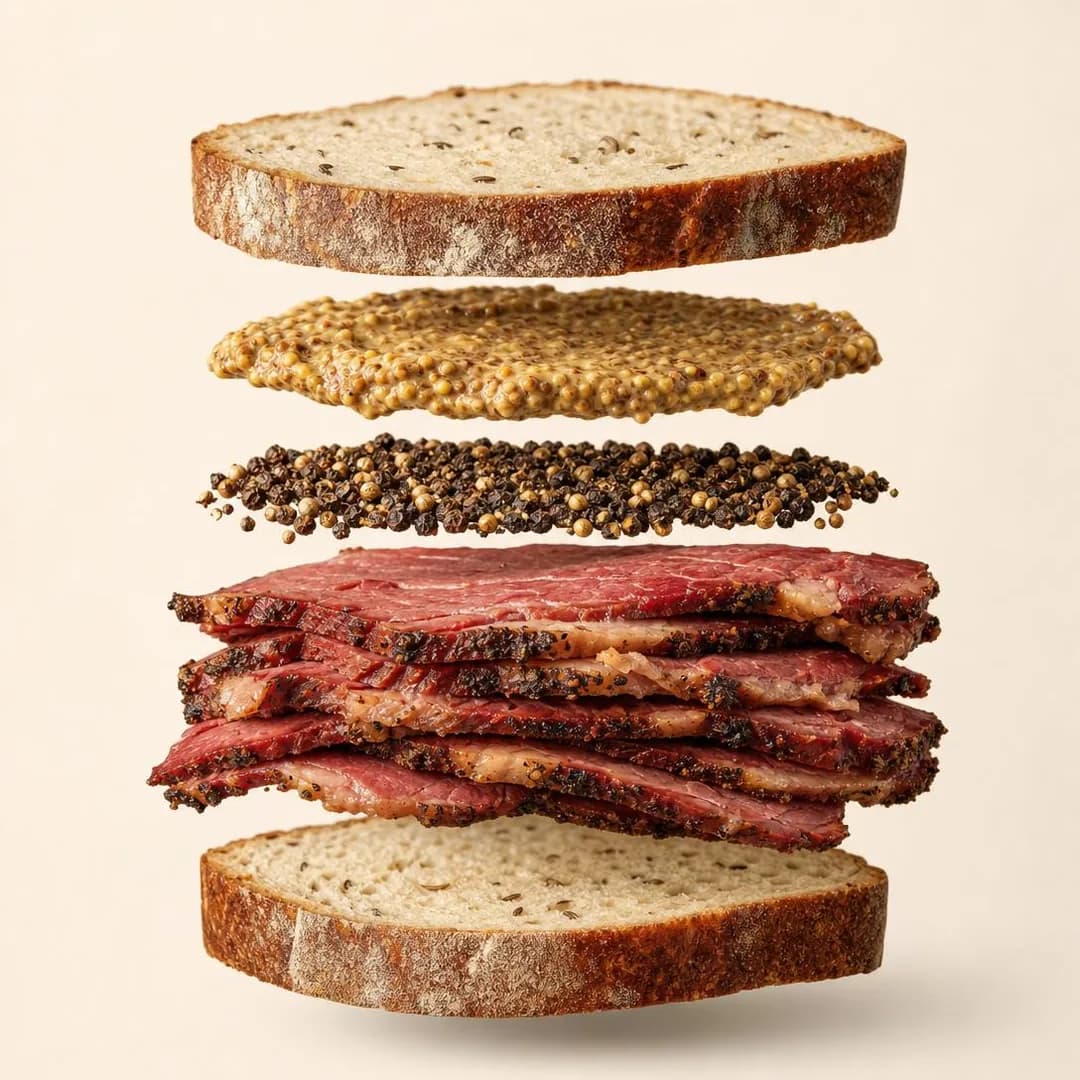 Example adHand-Crushed Coriander & Pepper BarkSee the brief →
Why your prices are what they are
Awareness- Who it is for.
- Locals who read the menu in the window and kept walking.
- Angle.
- Story & Founder POV — A signed, itemised note from the owner, run to the people who walk past. Leave a line for margin: the example's ledger sums to exactly $19 and leaves nothing for the business. Run it in the weeks before the price change and read the till then; once the new prices land, the till cannot separate the two. And in a small radius your staff and regulars will read it too, so every line has to be one they would sign.
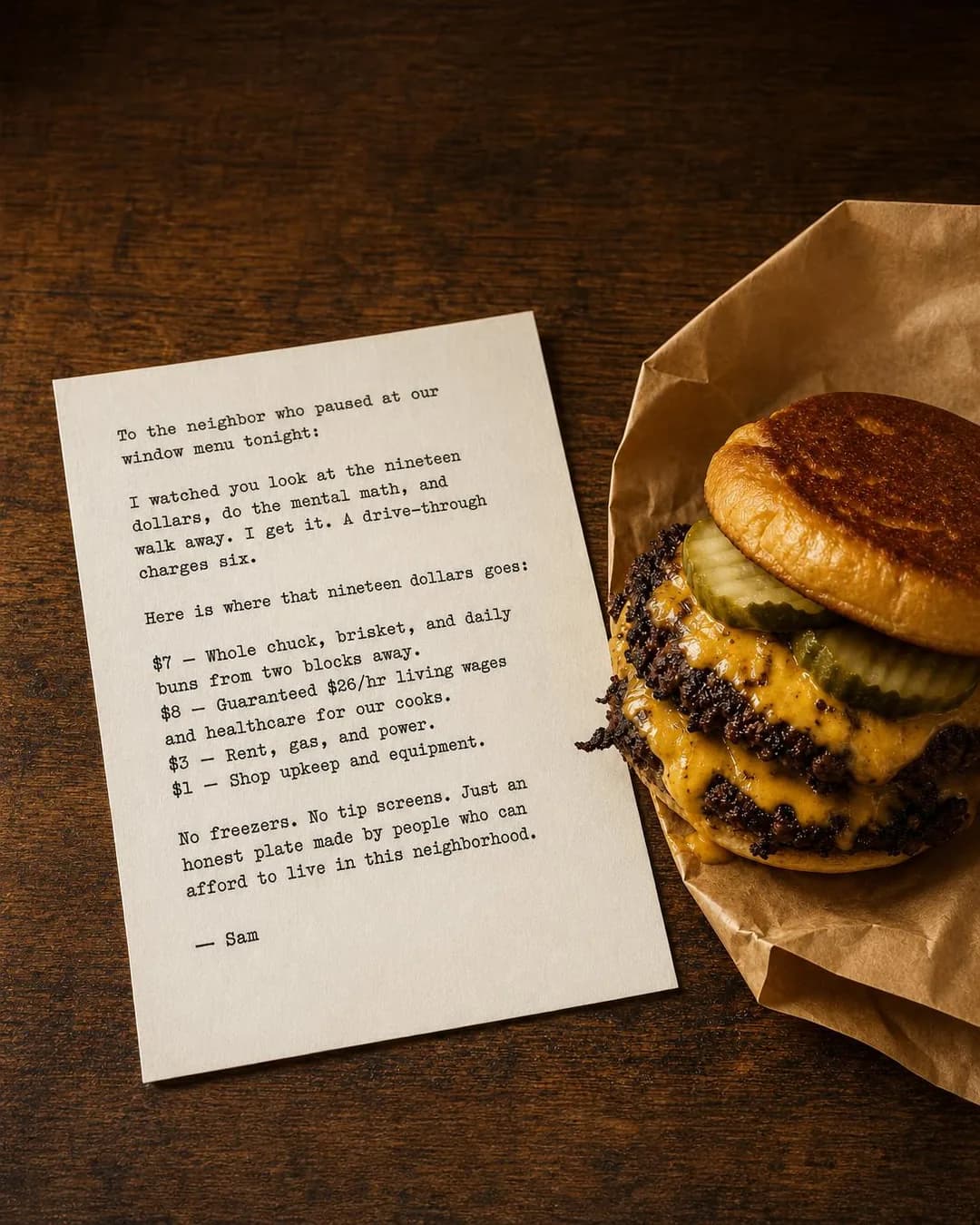 Example adWhere your $19 actually goesSee the brief →
Your own reviews, quoted exactly
Awareness- Who it is for.
- People who read the reviews before trying anywhere new, often the three-star ones first.
- Angle.
- Proof & Trust — Reviews are this trade's proof, and the example's format, leading with a complaint that is really a compliment, is the cleverest concept in the batch. Its content must not run: every reviewer is invented. In a one-mile radius the person you quote may well see the ad, so ask before you use their words, and quote them exactly.
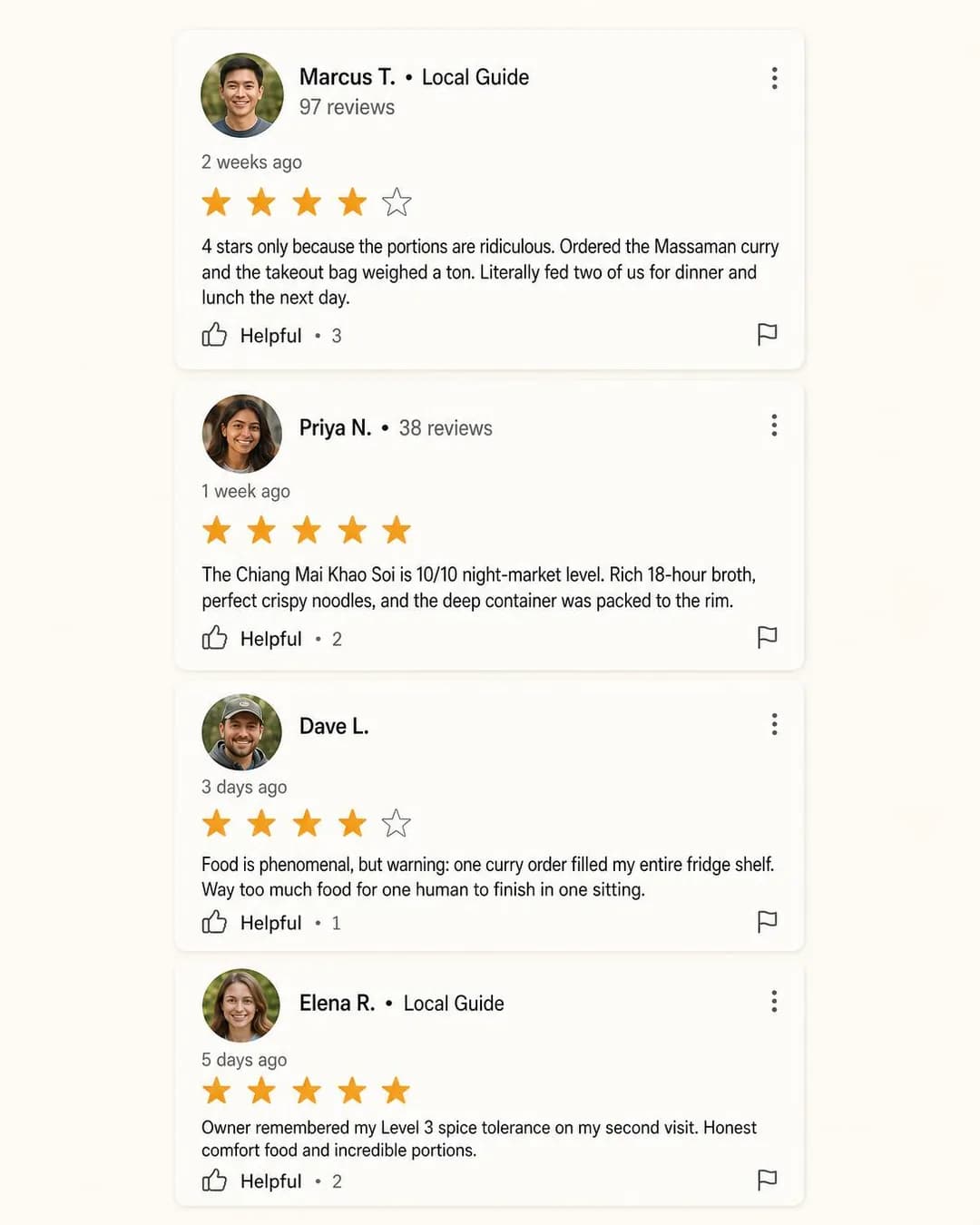 Example ad"The portions are ridiculous."See the brief →
A gluten-free or allergen-safe kitchen, proved by the room
Traffic- Who it is for.
- Parents and adults who stopped trusting a "GF" label on something that came out of a shared oven.
- Angle.
- Objection & Risk Reversal — The objection is trust, and the answer is a structure (a separate room, separate equipment, sealed boxes) shown on a page before anyone is asked for anything. Rarity widens the radius: the only dedicated gluten-free kitchen in town is worth a drive. Describe the room, never the reader; the creative section explains why the example's first line has to go.
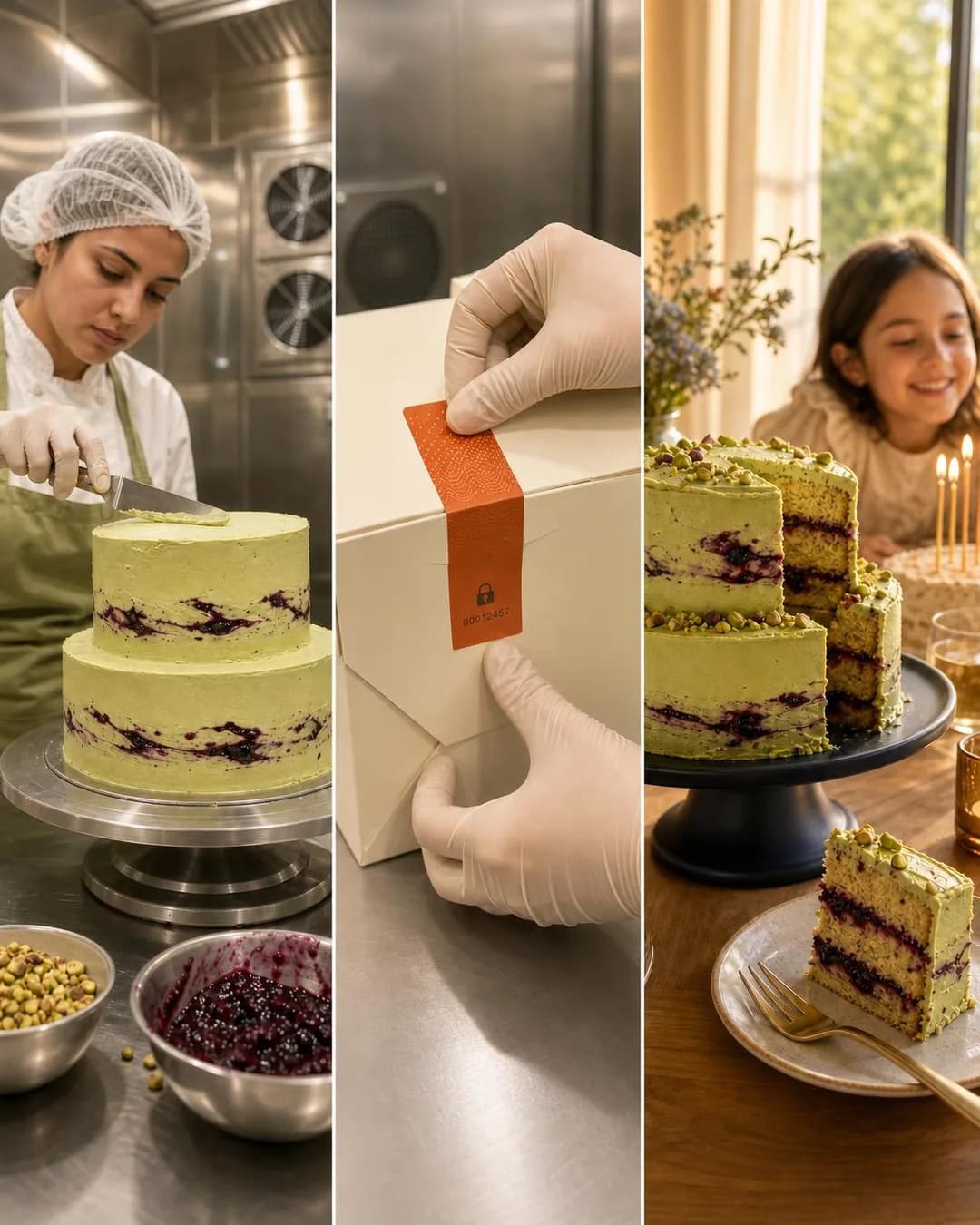 Example adZero Shared Ovens. 100% Real Cake.See the brief →
A waitlist you join from home
Traffic- Who it is for.
- Couples and families who stopped coming on your busiest night because of the wait, not the food.
- Angle.
- Problem & Pain — A deliberate exception to the rule against advertising a night you are already full. It cannot add covers at 7 p.m.; what it wins back is the guests you are losing to the sofa, who come again on other nights, and the phone numbers the measurement below runs on. If you want it to add covers too, name the early and late times in the copy and count those tables. Send it to the join page, with Learn more or Sign up as the button: Book now promises a reservation a walk-in room cannot take.
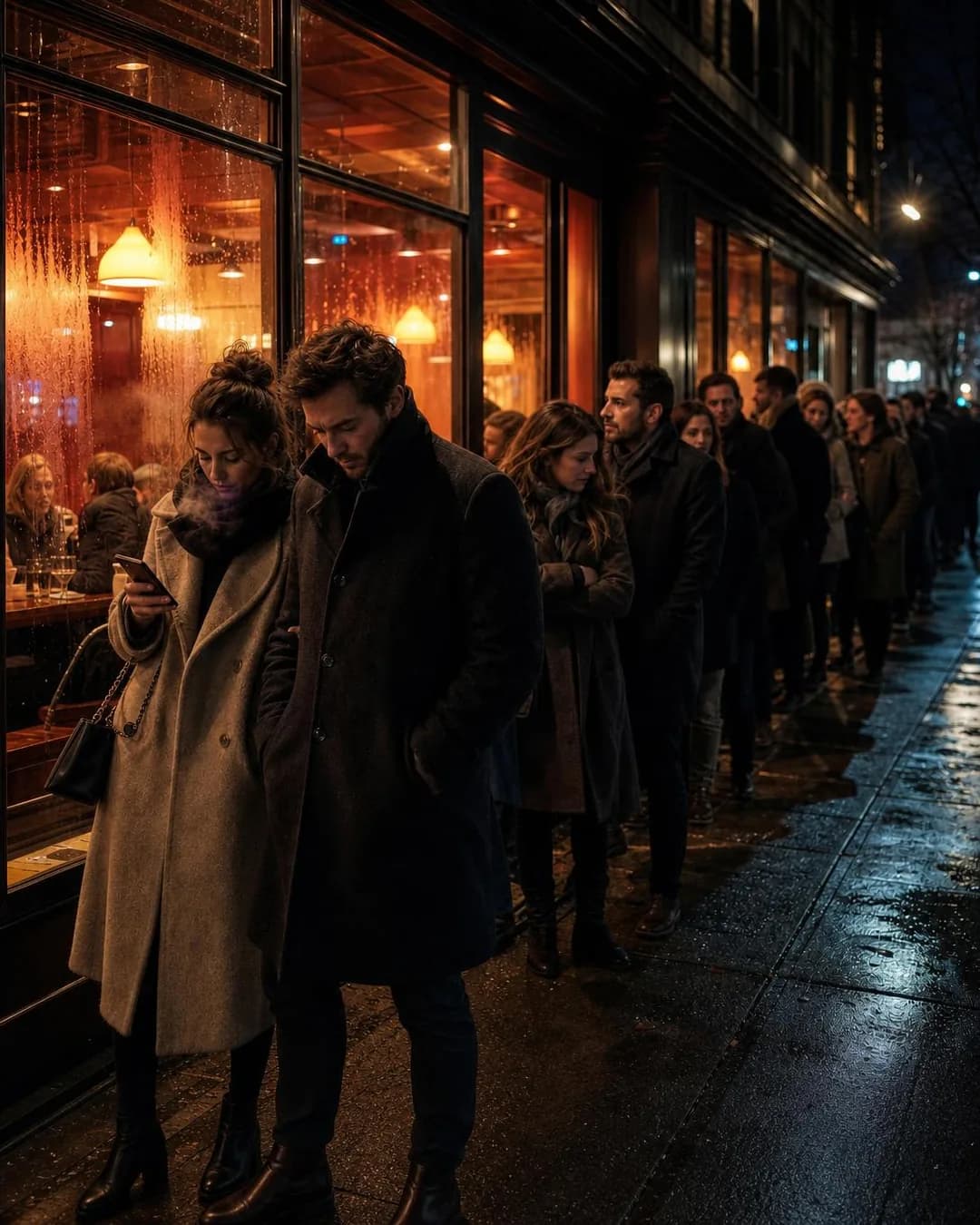 Example adDate night without the freeze.See the brief →
A recurring night: a supper club, a quiz, a tasting menu
Engagement- Who it is for.
- New neighbours who want a reason to come, and regulars who want a reason to come on a particular evening.
- Angle.
- Identity & Emotion — A dated night is how a restaurant sells company. If it is open to all, like a quiz, make it a Facebook event and buy event responses. If seats are capped and priced, sell them on a ticket page, because a tap on Interested is not a seat. Its copy names the night by definition, which makes it the natural tool for an empty one. The example's image stage added tumblers of house wine that nobody briefed.
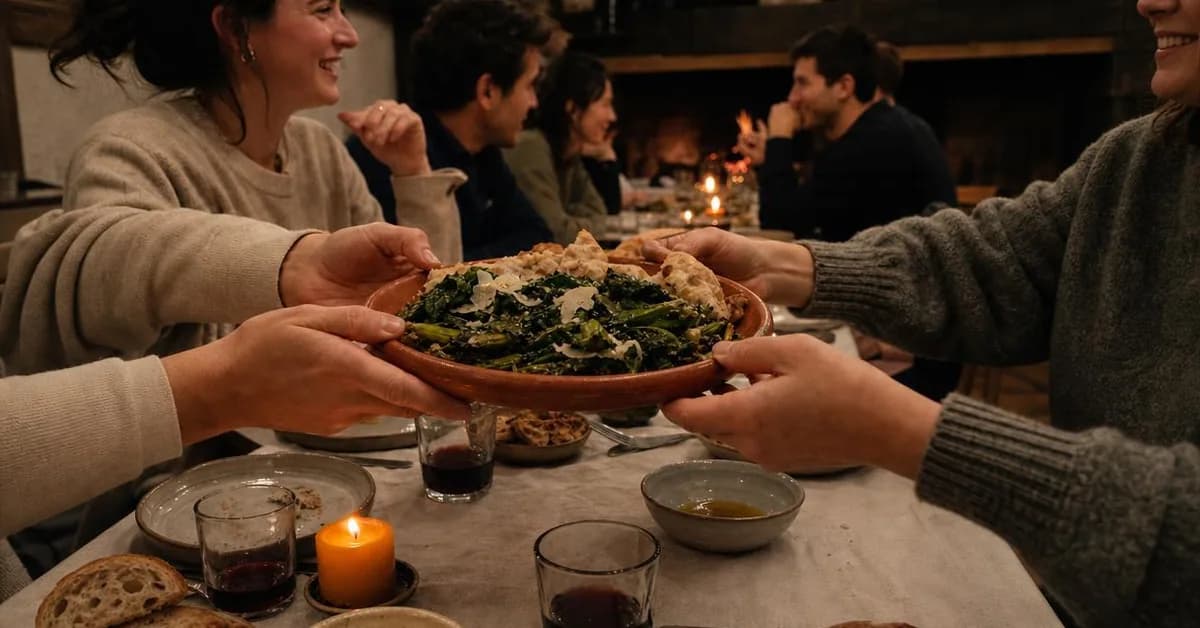 Example adStop Nodding. Start Talking.See the brief →
Pickup through your own online ordering, priced below the app
Sales- Who it is for.
- Regulars who order through a delivery app out of habit and have never opened your website.
- Angle.
- Comparison & Positioning — Two receipts for the same order make the argument concrete, and because the order happens on your page it can be a Sales ad. Get the blame right. In the example, $7.70 of the $16.70 gap is the app's service and delivery fees; the other $9.00 is menu prices the restaurant set higher on the app, and that part is yours to explain. A customer moved to direct ordering is worth the commission you stop paying minus the app markup you stop collecting, on every order they would otherwise have placed through the app. That is also the most you should pay to win one.
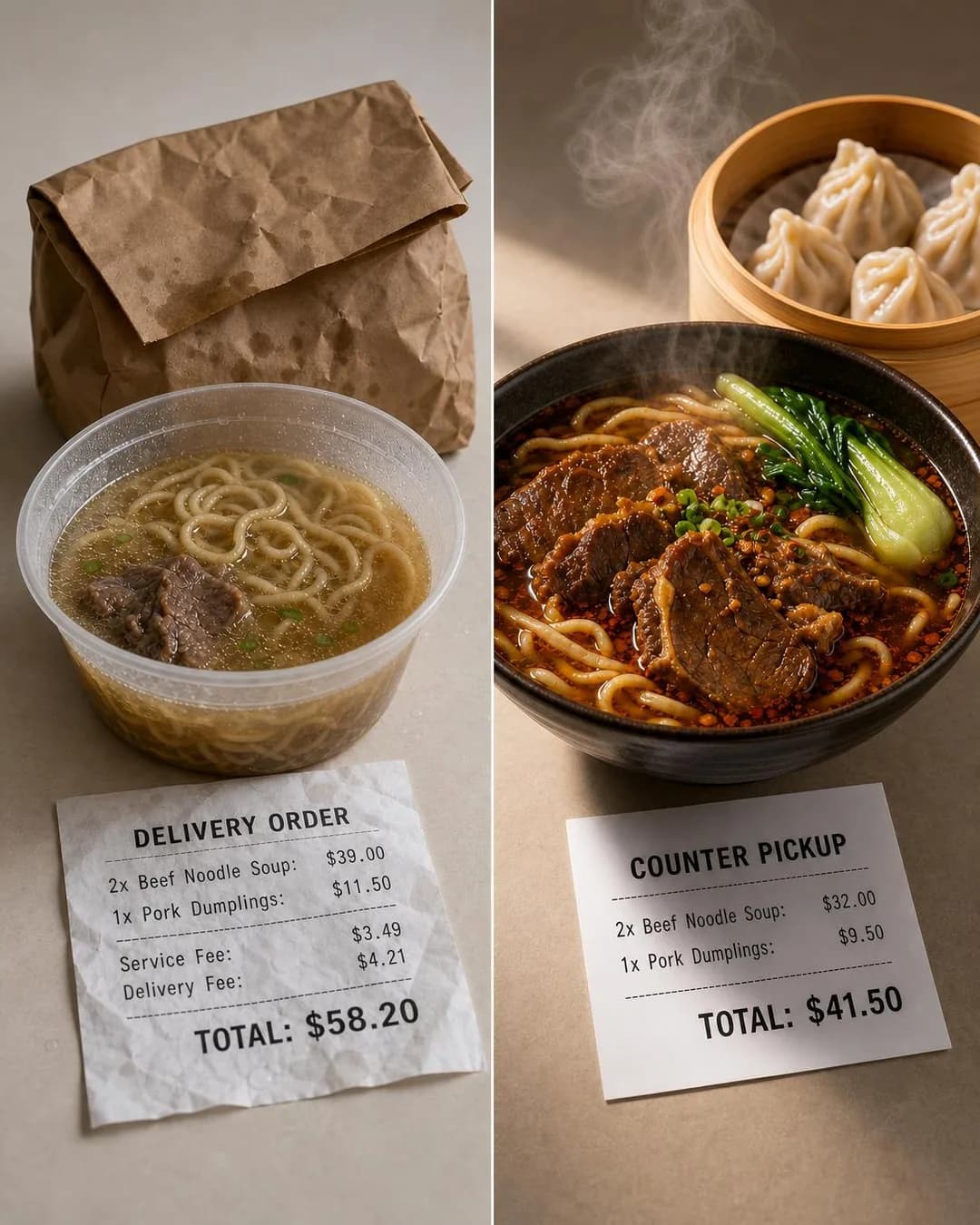 Example adSave $16.70: Skip the Delivery MarkupSee the brief →
A coffee club, a bread share, a lunch pass
Sales- Who it is for.
- People who already buy the same thing from your café or coffee shop most mornings.
- Angle.
- Offer & Economics — The argument is one division, the monthly price over the single price, so do it on paper: the example says visit 7 in one line and visit 10 in another. It also turns a counter sale Meta cannot see into a purchase it can, and every later visit by a member who gives their name at the counter is a visit with a name on it. Then check your side of it: the price against how often members actually come, times what each cup costs you.
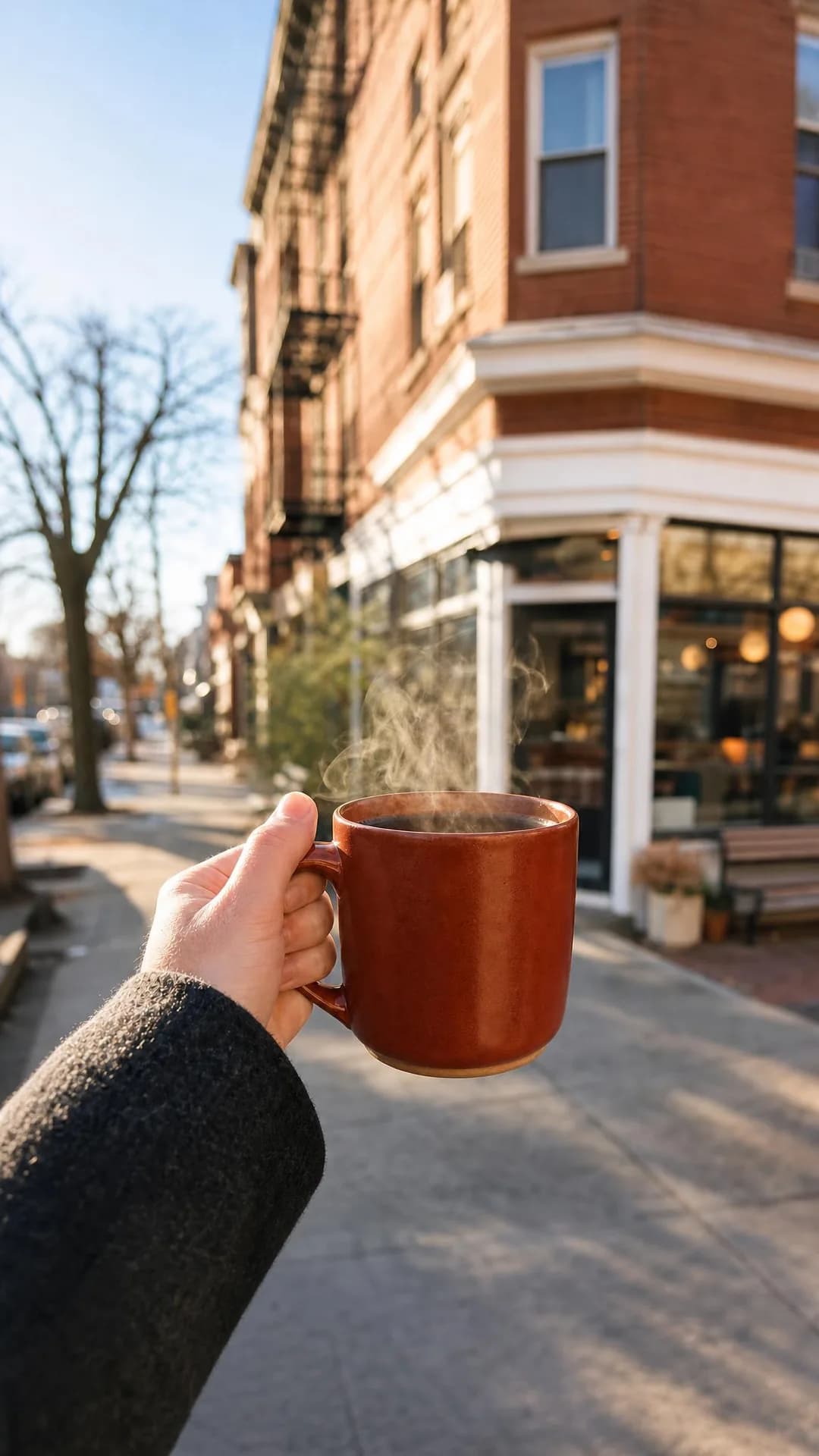 Example ad$30/Month. Coffee Every Morning.See the brief →
Holiday pre-orders with a real cap
Sales- Who it is for.
- People who ended up with a supermarket pie, cake or loaf last year and meant to order properly.
- Angle.
- Scarcity, FOMO & Timing — The limit is an oven, which makes the scarcity true, and the checkout makes it a Sales ad. The cap times the price is the campaign's ceiling, so this is the clearest case of an ad whose success should switch it off: stop it the hour the cap sells out. The buyers are next year's first audience. And put the pickup window in the image, which the example dropped.
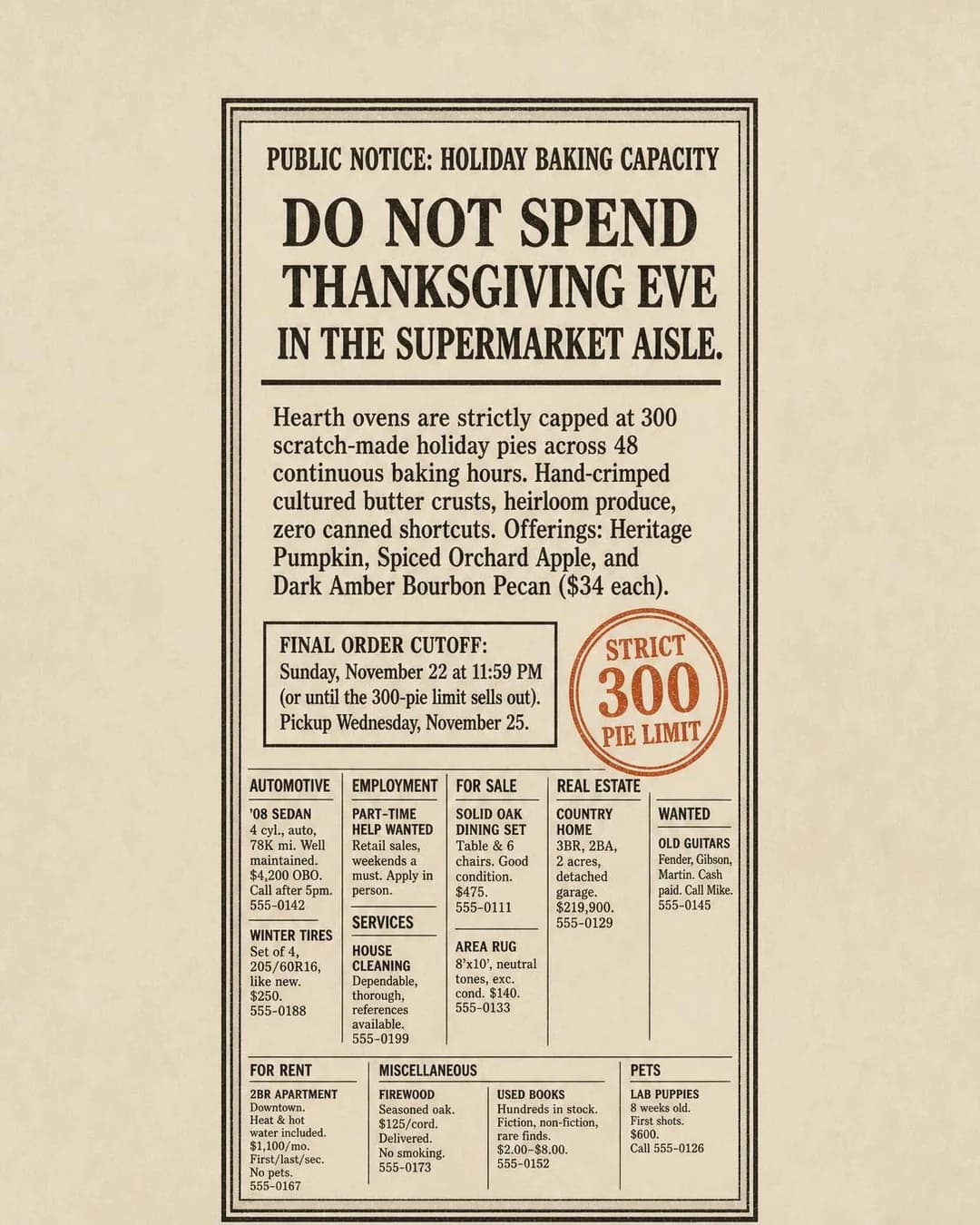 Example adSkip the Dented Grocery PiesSee the brief →
Gift cards in the last week before the holidays
Sales- Who it is for.
- Locals buying for locals: a colleague, a teacher, a neighbour, parents who live in town.
- Angle.
- Scarcity, FOMO & Timing — The timing argument makes itself in the week when every shipped present is too late and a card in an inbox is not. Bought online, a gift card is a purchase your pixel can see; redeemed later, it is a dinner Meta cannot. The person the ad reaches is the giver, so the radius finds local givers. It is also a future cover sold in advance. No ad in the current batch runs it.
No example ad for this offer on the examples page yet.
Office catering, delivered and laid out
Leads- Who it is for.
- Office managers and assistants who order the team lunch and then spend their own lunch hour serving it.
- Angle.
- Benefit & Outcome — The buyer is not the eater, so argue the buyer's hour: delivered early, set out, labelled, cleared. An office that orders monthly is an account, not a lunch, so ask how often on the form and value the lead accordingly. Photograph your real allergen cards. The example's cards list only what each dish lacks and have no line for the sesame in the tahini.
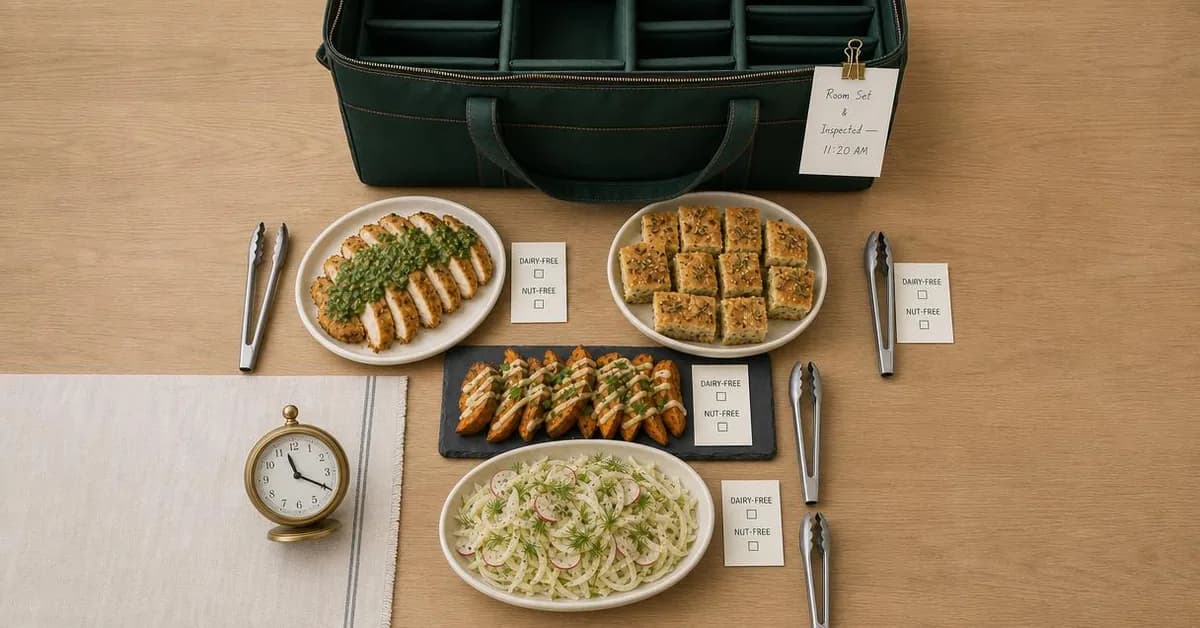 Example adReclaim 45 Min on Team Lunch DaysSee the brief →
Private dining and party bookings
Leads- Who it is for.
- People planning a rehearsal dinner, a fortieth birthday or a team's end-of-year dinner for twelve to forty.
- Angle.
- Offer & Economics — The objection is a bill nobody can predict (a minimum spend, a room fee, a service charge), and a price per head with everything in it answers it. A room booked on a dead weeknight fills that night in one sale, so quote a lower minimum for the nights you would otherwise lose and ask on the form whether the date is flexible. Make the headcount bands match your rooms. No ad in the current batch runs it.
No example ad for this offer on the examples page yet.
Custom and celebration cake orders
Leads- Who it is for.
- People ordering a birthday, graduation or wedding cake for a date weeks away.
- Angle.
- Proof & Trust — The proof is your own portfolio: show cakes you have made, never generated ones, because the customer will order the picture. A cake order is a conversation about a date and a name on the top, which makes it a Leads ad: an Instant Form with a date question and a size band, or a call ad run in the hours someone can take the order. No ad in the current batch runs it.
No example ad for this offer on the examples page yet.
Browse Facebook ad examples for a restaurant, café or bakery →
Targeting: the radius is the audience, and there are three of them
Food is not a special ad category, so a restaurant campaign keeps every lever: age, lookalikes, exclusions, custom audiences, and a pinned radius as small as 0.63 miles or 1 kilometre. What you cannot choose is who inside the circle counts. The location type is fixed at people who live there and people recently there, together, and for a restaurant that is the right answer anyway: the office worker in your street at lunchtime is a customer wherever they sleep.
A restaurant has at least three audiences, each a different shape: the dine-in radius, the order radius and the catering pins in the table below. Your competition sets the first, your delivery zone sets the second, and the third is not centred on you at all. Do not guess any of them: your pickup addresses, catering deliveries and pre-order checkouts are already a map of where your customers come from. Give each shape its own ad set, because each offer is only true inside one of them.
Advantage+ audience is the default to check before it quietly changes the plan. Since version 23.0 of Meta's API, a new ad set made through the API either defaults to Advantage+ audience or must set it explicitly, so look at the audience section of every new ad set in Ads Manager. Meta describes Advantage+ audience as widening the pool its delivery system can search, subject to a short list of constraints it will not expand: location, minimum age, language and custom-audience exclusions. On a radius campaign that costs you nothing, because the radius holds. On a regulars campaign it matters. An included customer list is not among those constraints, so treat it as a starting point rather than a boundary, and switch Advantage+ audience off for any ad set that must reach only the people on it.
Minimum age holds as well, and under Advantage+ audience it can be set anywhere from 18 to 25. So a 21+ ad set costs nothing but the split. In the United States, any ad that shows drinking or the sale of alcohol (the bar, a wine list, a glass on a table in a dinner photograph) goes in its own 21+ ad set, and everything else stays open to adults. Outside the United States, Meta's alcohol standard defers to local law.
One restaurant ad does carry a special ad category: the one that says "we're hiring". An ad offering a job must declare the employment category, which brings a minimum radius of 15 miles or 25 kilometres in the US and Canada, ages fixed at 18 to 65 and over, no ZIP codes and no lookalikes. Meta warns that with the wrong category "there is a risk your ads will be paused until the campaign is adjusted". Hire in a campaign of its own.
Last, the lists you already own. The waitlist, the reservation book, pickup orders and club members are the audience closest to a sale, because every name on them has eaten your food, and seated parties you upload as offline events can become a custom audience of their own. Uploading a customer list is a promise to Meta: its Custom Audiences terms have you warrant that you hold "all necessary rights, permissions, and a lawful basis" to use the data. Read your privacy notice and your reservation provider's terms before the first upload.
- Dine-in radiusUse it — your competition sets it
- How far people will come for this meal: a walk for a café with five others within a walk, a drive for the only dedicated gluten-free bakery in town. Any pinned radius runs from 0.63 to 50 miles, or 1 to 80 kilometres.
- Order radiusUse it — pickup and delivery
- Your delivery zone, or the distance people will drive to collect. Draw it from your own pickup and delivery addresses.
- Catering pinsUse it — not centred on you
- The office districts you can reach before eleven, built by dropping pins on them.
- Location typeFixed
- People who live in the area and people recently in it, together. There is no longer a choice, and for a restaurant the lunchtime office worker and the weekend visitor are customers anyway.
- AgeUse it — 21+ wherever alcohol appears
- Adults by default; a separate 21+ ad set in the US for anything showing drinking or the sale of alcohol. Under Advantage+ audience the minimum is a hard limit you can set from 18 to 25. Meta says call ad sets should not include anyone under 18.
- Advantage+ audienceCareful — off for regulars
- The default for new ad sets made through Meta's API since v23.0. Harmless on a radius campaign; switch it off for a regulars campaign, because Meta does not list an included audience among the constraints it will not expand.
- Customer lists and offline-event audiencesUse it — they have eaten here
- Waitlist, reservations, pickup orders, club members and uploaded seated parties. Sell them the next thing, and exclude them from first-visit offers. Check your right to upload first.
- Custom-audience exclusionsUse it
- They hold even with Advantage+ audience on. Exclude club members from the club ad, recent pickup customers from the first-order offer, and this month's party inquiries from the private-dining ad.
- LookalikesRarely
- The radius already does the qualifying, and one restaurant's list is a small seed. Worth a test for pre-orders and gift cards; not for a lunch counter.
- Detailed targeting (interests)Rarely
- "Foodies" inside a two-mile circle is a smaller audience, not a better one. Let the radius and the offer do the selecting.
- Special ad categoryNone — except hiring
- Food is not a category. A hiring ad is an employment ad, with a 15-mile / 25 km minimum radius in the US and Canada, fixed ages and no lookalikes. Give it its own campaign.
- ScheduleUse it for calls and meals
- Schedule call ads to the hours someone answers, and meal ads so they land before the decision: Friday afternoon for Saturday dinner, late morning for lunch. An ad set can carry a schedule by day and by minute, in the viewer's time zone by default; check in Ads Manager which budget types allow it on your account.
- Advantage+ placementsUse it
- Leave them on for image ads. Call ads deliver only on mobile placements, whatever else you select.
- Place page sets (restaurant groups)Only with location Pages
- Built from a parent Page with location Pages under it, and pointed at by one ad's creative. Meta's guide to it could not be reached when we checked; confirm what it does in Ads Manager.
Where the click goes: a button, your ordering page or a lead form
The usual question is lead form or landing page. A restaurant has an earlier one: should there be a click at all? For a dine-in ad, usually not. The reader has seen the dish and wants either to get there or to ask about a table, and Meta has a button for each. Where your dine-in radius is a drive, use Get directions, which opens a map. Where the call is the booking (a table, a cake), use Call now in the hours before service. For a lunch counter inside a walk, the name and the street in the picture are the instruction and neither button is needed. For people who want to read first, your Facebook Page is the page. A call ad's number must be in the same country as the audience.
Anything sold on a screen goes to your own screen. Pickup, the club, a pre-order or a gift card sold on your own site can carry the Meta pixel and report a purchase with its value, which is the whole reason to buy Sales. Ask your ordering provider two questions before choosing the objective: can I add my Meta pixel, and does a completed order send a Purchase event with the order value? If the answer is no, run the ad as Traffic and count the orders yourself. A listing on a delivery app is somebody else's page. Your pixel is not on it, and the commission comes out of the order the ad just paid for.
A restaurant that takes reservations can run a Book now ad to its booking page as Traffic, optimised for landing page views. Count the bookings in your reservation system, ask the provider the same pixel question, and upload the seated parties afterwards.
Catering, private dining and cake orders go to an Instant Form, and the first thing to know about that form is when its leads disappear. Meta keeps them downloadable for 90 days from submission, so a Christmas party inquiry sent in September can vanish around the week of the party. Connect the form to your email or booking system, or download the leads every week.
Then build the form around the three facts every such sale starts with. There is a date-and-time question type, and a custom question can offer a list of choices, so the form can ask for the date, a headcount band that matches your rooms, and dietary requirements by allergen, which is the question an office manager otherwise answers twelve times on the day. Choose the Higher intent form type, which adds a step where people review their answers before submitting, and consider the separate setting that verifies the phone number by text.
Leads has two other destinations that suit this trade. It can send the reader into Messenger instead of a form, which fits private dining, where the useful answer is a conversation with a manager about a room. And it can send them to a phone call, optimised for sixty-second calls, which fits catering and cakes, where a buyer may want to ask one question and order. Both only work if somebody answers.
Anything with a date goes to the event. If the supper club or quiz exists as a Facebook event, the Engagement objective can use the event itself as the destination and optimise for responses. If seats are sold on a ticket page instead, that is a Traffic or Sales ad to the ticket page, and the number of seats left is the scarcity.
The recommendation: Dine-in: no website. A Get directions or Call now button under Awareness, with call ads scheduled to the hours someone answers. Pickup, the club, pre-orders and gift cards: your own ordering page, carrying the Meta pixel, never a delivery-app listing. Reservations: your booking page. Catering, private dining and cakes: an Instant Form on Higher intent with a date question and a headcount band, leads pulled out of Meta well inside its 90 days. Anything with a date: the Facebook event, or a ticket page if seats are capped. A landing page only where the reader must see something first.
Creative direction
Start with what a neighbourhood buy does to an ad: the same people see it again, and you cannot choose which of your ads a neighbour sees first. So every ad has to say what the place is and where it is, and the reasons to come this week should vary across them. Rotate a few creatives inside the cap, and let a changing menu do the rotating for you; a fixed menu has to manufacture its variety. Put the night and the hours in the frame whenever the offer has them. The schedule decides when an ad is seen; the copy, not the schedule, names the night. And for people who have walked past for years, show the front they walk past as well as the dish, because a Get directions ad has no page to show what your front looks like.
In a restaurant ad the picture of the food is a statement about the menu. A customer who orders what the ad showed and gets something else has been misled, whoever drew it. Most of the ten ads on the examples page show dishes their one-line briefs never mentioned, but most of those came from the menu a model wrote for each invented restaurant in place of a website, and the ads copied them faithfully. The failures that would reach your own ads happened later, in the picture: the pastrami came back with a layer of loose peppercorns that no sandwich has. Check a generated image dish by dish against your menu, or photograph your own.
Then look for a glass. None of the ten briefs mentioned a drink, and both ads that came back with wine were for restaurants whose invented menus sold it: the picture took the drink off the menu and put it on the table. A glass on the table puts the whole ad set at 21+ in the United States.
Some claims a kitchen has to be able to prove. Gluten-free has a federal definition, under 20 parts per million, and the FDA expects a restaurant's menu claim to be consistent with it, so the word carries a standard whether or not you print a number. Sesame has been the ninth major allergen since 1 January 2023. An allergen card that lists what a dish does not contain and leaves out what it does is worse than no card.
Describe the room, never the reader. Meta's personal attributes standard prohibits content that asserts or implies a person's health, including medical conditions, or implies you know "the personal attributes of their family". Dietary need is where a restaurant is most likely to meet the rule, and "when your child can't eat gluten", the gluten-free ad's first line, is the natural sentence and the prohibited one. A line about a room that wheat flour never enters sells the same cake and asserts nothing about anybody.
Never let a model compute the number an ad rests on. A break-even, a price per head, a saving against the app: each is a sum you can do on paper in ten seconds, and a model can get the same one right and wrong in a single run. Leave a line for margin in any price breakdown. And when your app prices are higher, separate the fees the app charges your customer from the menu prices you set, and explain the second yourself.
Shape and length: Facebook Feed wants 4:5 at 1440 × 1800, primary text of 50–150 characters and a 27-character headline; Marketplace wants a square with a 30-character description, which all ten ads in this batch met. Most of the batch's primary texts and headlines run past Feed's figures, so measure every ad before it runs. The counts are on the examples page.
- Make every ad say what and where, because you cannot choose which one a neighbour sees first; vary the reason to come this week across them.
- Name the night and the hours in the frame whenever the offer has them. The schedule controls when an ad is seen, not which night anyone comes.
- Show the front of the building as well as the food in any ad without a website behind it.
- Photograph the dish you serve, or check a generated one ingredient by ingredient against the menu.
- Look for a glass before you read the headline. If your menu sells drink, expect it on the table in a dinner scene.
- Describe the room, never the reader. Dietary need is where a restaurant meets Meta's personal attributes rule.
- Print gluten-free only if the dish meets the federal definition, under 20 parts per million, and put sesame on every allergen card. A card that lists what a dish lacks and leaves out what it contains is worse than none.
- Use only reviews that exist, quoted exactly, and ask the reviewer first.
- Do the arithmetic yourself, and leave a line for margin in any price breakdown. Break-evens, per-head prices and savings are ten-second sums a model gets wrong.
- Separate the app's fees from the menu prices you set on the app, and explain the second yourself.
- Keep hiring out of customer ads, down to a help-wanted listing in a generated background.
- Render 4:5 at 1440 × 1800 for the feed, and aim for a 27-character headline and 150 characters of primary text.
- Keep a 1.91:1 export for catering: our publisher routes that shape to Facebook's right-hand column and search.
Campaign structure: four lines, one for each place the sale happens
A dinner is decided close to the meal, and a private party or a holiday order is decided weeks ahead, so the structure is not a sequence of stages one person walks through. It is four lines running side by side, one for each place the sale happens. Each is judged by its own instrument and sized by its own arithmetic, not by a percentage of a budget.
The neighbourhood line will show almost nothing in the conversions column, and the screen line will show purchases. That tells you what Meta can see, not which line is working. A café with no catering and no private room runs the first two lines and a small fourth, and that is a complete account.
The neighbourhood
Sized by the reach sum belowAudience. Everyone inside the dine-in radius, living there or recently there. Customer lists excluded from first-visit offers.
Running. The dish, the price letter, real reviews: Awareness on Reach with a cap and a Get directions or Call now button. The waitlist and allergen pages as Traffic. Open events as Engagement.
Screen sales
50 × your cost per purchase, a weekAudience. The order radius for pickup and the club most of the year; the dine-in radius for pre-orders and gift cards in November and December.
Running. As few Sales ad sets as your volume feeds, usually one, on your own ordering page with the Meta pixel reporting a purchase and its value. Pre-orders from the start of November.
Inquiries
Up to booking margin × booking rate, per inquiryAudience. Pinned office districts for catering; the dine-in radius and a little beyond for private dining and cakes.
Running. Leads, on an Instant Form with a date question and a headcount band, or to calls and Messenger during the hours someone answers. Private-dining ads open in September for December.
Regulars
Small, because the list isAudience. Waitlist, reservation, pickup and club lists and uploaded seated parties, with Advantage+ audience switched off. Visitors to your ordering page.
Running. The next thing to buy: an event, the club, the holiday pre-order a week before the public, a new menu shown to people who already know the old one.
Budget and measurement, worked out from your own neighbourhood
Start with the neighbourhood line, because it is arithmetic about a population rather than a guess about who will respond. The reach sum: the accounts in the audience estimate Ads Manager shows for your dine-in radius, × the sightings a week you will pay for each of them, ÷ 1,000, × your CPM (cost per thousand impressions) = roughly the weekly cost.
Treat it as an upper-end planning figure rather than a promise: a frequency cap is a maximum, and the auction does not guarantee that everyone reaches it. If you have never run Reach you do not have a CPM yet, so run the ad set for one week at a spend you choose, read the CPM off the report, then do the sum, remembering that the CPM at a larger spend may differ from the test week's.
Then work out what the line has to produce, on the service it is meant to fill. An extra cover on a quiet Tuesday is worth roughly the bill minus the cost of the food, because the staff are already rostered and the rent is already paid. An extra cover at seven on a full Saturday is worth close to nothing, because the table would have sold anyway. So: weekly cost ÷ (the bill − its food cost) = the extra quiet-night covers a week the line must produce to pay for itself. And weekly cost ÷ (average bill × the visits a regular makes in a year on services you could not otherwise fill × your margin) = the new regulars a week it must find. If either number is larger than you would ever notice at the door, shrink the radius or lower the cap before you spend.
Set the cap per offer, over the interval the decision takes. A lunch counter's regulars decide every day, so their cap runs over seven days; a tasting menu or a birthday dinner is decided over weeks, so its cap is lower and runs over thirty. The cap can cover anywhere from 1 to 90 impressions over 1 to 90 days. Pair it with the schedule so the sightings land before the decision: Friday afternoon for Saturday dinner, late morning for lunch.
You will buy that reach in the auction. Meta's other buying type, Reach and Frequency, is available only to some ad accounts and needs a target audience of at least 300,000 accounts and a minimum reach of 200,000 in a single country. If your radius is smaller than that, and one restaurant's usually is, the auction is where you buy. The frequency cap on an auction Reach ad set, available only with the Reach and ThruPlay goals, is a restaurant's media plan.
The screen line's problem is volume. Meta's delivery system needs roughly 50 purchases a week per ad set to finish its learning phase, the stretch after launch when it is still working out whom to show the ad to. Multiply what Meta charges you per online order by 50 and compare it with your weekly budget. If it is larger, put the screen offers that share a radius in one Sales ad set rather than four that each stay stuck, and switch its radius and offers for November and December. A regulars-only pre-order or a lookalike test is a second Sales ad set, so run one only if 50 × your cost per purchase covers both.
Then measurement, which you build yourself from three instruments. The first is the till: compare the weeks an ad runs with the weeks it does not, on the same days of the week, and accept that the answer is a range. It is the only instrument that measures what the ads caused. The second is a code, word or named offer redeemed at the counter and counted by you. Meta's own promo-code feature applies codes at checkout on a website, so an in-store redemption is yours to count.
The third is the bridge, and it needs no developer. In Meta's Events Manager, create a dataset and assign it to your ad account. Upload a CSV file of the parties you seated: a phone number or email, the time, and the bill if you want value reported. Upload within 62 days of the visit; weekly is a sensible rhythm. The matched parties appear in Ads Manager under the offline conversions columns, and the same uploads can build a custom audience.
Read them carefully. Waitlists exist on full nights, so the dinners you can upload lean toward the services an ad cannot improve: count with them, but do not move money by them. Each upload is a table, not a head count. The number worth watching is first visits: phone numbers your waitlist or reservation book has never seen before. Your own records can pick those out, and their count in the weeks the ads run against the weeks they do not is as close as this data gets to new guests the ads found.
Some point-of-sale companies sell a shortcut. Toast runs its own ad product and says the sales it reports for Meta campaigns combine online, catering and on-premise sales "attributed to your campaign" using "Meta's attribution technology". Its help page does not say how a guest at a table is matched, and that answer decides what the number means, so ask before you let it judge your ads. Square's Meta help, when we checked, covered its online store rather than in-store sales.
Last, spend where the capacity is. A Saturday at seven sells itself and a Tuesday at six does not, and the arithmetic above says the Tuesday cover is the one worth paying for. Point the neighbourhood line at the services you cannot fill, with copy that names them. Run pre-orders from the start of November, and open private-dining ads in September for December: the calendar a guest plans on runs weeks ahead of the one the kitchen works to.
- Test the offer, not the headline. A new dish, price or night is a real test; five different words about the same dish are a change too small to read on the till.
- Read the neighbourhood line on reach and frequency against the audience estimate, and on the till in on-and-off weeks, over at least a month. One good Friday is weather.
- Do not hunt for the right frequency by raising it week by week. Each level takes several weeks of till comparison to read, and a change smaller than your till's normal week-to-week swing will not show.
- Put a code or a named offer in any ad you want to count at the counter, and count it.
- Upload seated parties weekly, and count first visits, meaning numbers your lists have never seen, in on-and-off weeks.
- Judge call ads on sixty-second calls and callback requests, not on calls placed.
- Judge an inquiry ad on cost per inquiry against what an inquiry is worth to you: booking margin × your booking rate.
- Before blaming the creative on a Sales ad set, check whether it ever left learning.
Seven of these ads, in full
Every ad below was generated by best-in-slot for a restaurant, café or bakery that does not exist, with its audience, angle and objective pinned before the run — and published exactly as it came back. They are seven of the Facebook examples for a restaurant, café or bakery; the rest, with the full brief and the alternate headlines behind each one, are on that page.
Product & Mechanism · 1:1 · Awareness
Hand-Crushed Coriander & Pepper Bark
Written for: People who once ate a real pastrami sandwich somewhere else.
The full brief and why it works →
Problem & Pain · 4:5 · Traffic
Date night without the freeze.
Written for: Couples who stopped going out on Saturdays.
The full brief and why it works →
Identity & Emotion · 1.91:1 · Engagement
Stop Nodding. Start Talking.
Written for: People who moved to the neighbourhood and still know nobody on their street.
The full brief and why it works →
Comparison & Positioning · 4:5 · Sales
Save $16.70: Skip the Delivery Markup
Written for: Regulars who always order through the app out of habit.
The full brief and why it works →
Offer & Economics · 9:16 · Sales
$30/Month. Coffee Every Morning.
Written for: People who buy a coffee on the way to work most mornings.
The full brief and why it works →
Scarcity, FOMO & Timing · 4:5 · Sales
Skip the Dented Grocery Pies
Written for: People who ended up with a supermarket pie last year.
The full brief and why it works →
Benefit & Outcome · 1.91:1 · Leads
Reclaim 45 Min on Team Lunch Days
Written for: Office managers who order the monthly team lunch.
The full brief and why it works →
Browse Facebook ad examples for a restaurant, café or bakery →
Mistakes specific to this trade
The first two are one mistake seen from opposite ends: paying to fill the night that fills itself, and then judging the line meant to fill the others by a column that cannot see it. The rest are ordinary, expensive and specific to kitchens.
Advertising the night you are already full
An ad that brings more people to a full Saturday lengthens the waitlist and adds no covers. Put the money behind the services you cannot fill and name them in the copy. The waitlist ad is the one exception, and it earns its place with the guests it wins back and the numbers it collects, not with that night's covers.
Judging dine-in ads on the conversions column
It will be close to zero, and a Sales ad set beside it will look far better, because Sales counts purchases on a screen and dine-in happens at a table. Switching off the neighbourhood line on that comparison is how restaurant accounts end up running only the part Meta can see. Judge it on reach and on the till.
Offering a first-visit discount to the whole neighbourhood
Exclusions only remove the regulars who gave you their details. The regular who pays by card and has never joined a list is invisible for the same reason the dinner is, sees the discount, and uses it on a visit they would have made anyway. Offer something that brings a new person in without discounting the people already coming: a night, a dish, a club.
Buying Sales and sending it to a delivery app
Your pixel is not on a delivery-app listing, so Meta's delivery system spends the budget learning from a purchase that never reports back, and the app takes its commission on the order the ad paid for. Sales goes to your own ordering page.
Running every offer on one radius
A lunch counter's audience is a walk, pickup's is the order zone, and catering's is the office districts you can reach by eleven. One circle is too big for the first and centred in the wrong place for the last. Build one ad set per shape, drawn from your own order addresses.
Running a wine glass to an 18+ audience
A dinner photograph with wine on the table is an alcohol ad under Meta's standard, and in the United States that means 21 and over. Generated images take drinks off the menu and put them on the table unasked, so check every render before it goes in the 18+ ad set, and keep the bar in its own.
Selling a dietary kitchen by describing the diner
The gluten-free example's headline, "Built for Strict Wheat-Free Kids", implies a medical condition in the reader's family, which Meta's personal attributes standard prohibits. Sell the structure instead: the separate room, the separate ovens, the sealed box.
Running call ads through dinner service
At half past seven on a Saturday nobody answers the phone. Schedule call ads to the hours someone is at it, judge them on sixty-second calls rather than calls placed, and watch callback requests for the people who asked you to ring them back.
Putting a hiring line in a customer ad
An ad that offers a job is an employment ad, and its campaign must declare that category and accept its limits. A "we're hiring" line in a lunch ad may make Meta treat the lunch ad as one, and a wrongly declared category is something Meta says risks the ads being paused. Hire in a separate campaign.
Running a capped pre-order after it sells out
The cap is what made the ad true. Once the ovens are spoken for, every further impression is a customer told there are pies who then finds there are none. Watch the order count and stop the ad set the hour the cap is reached.
Counting event responses as seats
Event responses are what the Engagement objective optimises for, and a tap on Interested costs the guest nothing. For an open quiz night that is fine. For thirty seats at $45 a head, sell the seats on a ticket page and count the tickets.
Running a review grid you did not collect
The FTC's rule on consumer reviews and testimonials, in force since 21 October 2024, makes it a violation to create or disseminate a review that misrepresents that the reviewer exists. A generated grid of smiling reviewers is exactly that. In a small radius, the real reviewers are your neighbours; ask them, and quote them word for word.
Questions
- What is the best Facebook ad objective for a restaurant?
- Awareness, with Reach as the performance goal, for anything eaten at your table or bought across your counter. Meta closed its store-traffic objective to new campaigns and moved its store location features into Awareness; Reach is one of two goals that accept a frequency cap; and in Ads Manager the Get directions button is offered under Awareness and no other objective. Use Sales for things bought on a page you own (pickup, a club, a pre-order, a gift card), Leads for catering, private dining and cake orders, Traffic for a waitlist or booking page the reader has to see, and Engagement with event responses for a Facebook event.
- How much should a restaurant spend on Facebook ads?
- Work it out from your own neighbourhood. The accounts in your radius, times how many times a week you want each to see you, divided by 1,000, times your CPM (cost per thousand impressions), is roughly the most those impressions will cost in a week, because a frequency cap is a maximum rather than a guarantee. If you have no CPM yet, run one week at a spend you choose and read it off the report. Then divide that weekly cost by what an extra cover on a quiet night is worth to you (the bill minus the food cost) to see how many extra covers it has to produce. For online sales, multiply your cost per purchase by 50, the weekly volume an ad set needs to finish learning, and keep to as few Sales ad sets as that volume can feed.
- How do I know if my restaurant's Facebook ads are working?
- Not from the conversions column, which stays near zero for dine-in because a card at a table leaves nothing Meta can match. Use three instruments. Compare your till in the weeks an ad runs against the weeks it does not, which is the only one that measures cause. Count a code or named offer at the counter. And upload the parties you seated from your waitlist or reservations as offline events, a CSV file in Events Manager, so they appear in Ads Manager's offline conversions columns. That upload shows who ate after seeing an ad, not whether the ad brought them, so count first-time guests in the weeks the ads run against the weeks they do not.
- What radius should a restaurant target with Facebook ads?
- More than one. The dine-in radius is how far people will come for this meal (a walk for a lunch counter, a drive for a destination), the order radius is your delivery zone or pickup distance, and catering is a set of pins on office districts. Draw them from your own order and delivery addresses. A pinned radius can run from 0.63 to 50 miles, or 1 to 80 kilometres, and covers people who live there and people recently there. A hiring ad is the exception: it falls under Meta's employment category, with a minimum radius of 15 miles or 25 kilometres in the US and Canada.
- How do I get catering leads from Facebook ads?
- Run a Leads campaign on an Instant Form, Meta's lead form, built around the facts every catering order starts with: a date-and-time question, a headcount band offered as choices, and dietary requirements by allergen. Choose the Higher intent form type, which adds a review step before submission, and consider phone verification by text. For buyers who would rather ask one question and order, Leads can also send people to a phone call optimised for sixty-second calls. Then get the leads out of Meta: they can be downloaded for 90 days from submission, and holiday inquiries arrive months ahead.
- Should a restaurant boost posts or use Ads Manager?
- Boost is the quickest way to put a post in front of people, and it is fine for telling followers about tonight's special. The settings a restaurant account depends on (a Reach goal with a frequency cap, more than one radius, a separate 21+ ad set, customer-list exclusions, a Get directions or Call now button) are all in Ads Manager. If the Boost screen does not offer the one you need, build the ad there.
- What Facebook ads work best for a café or bakery?
- The same split applies, with a counter instead of a table. Counter sales are Awareness on a tight radius, judged on the till. The sales that can happen on a screen are a café's best Sales ads: a coffee club or lunch pass, holiday pre-orders with a real cap and a pickup window, gift cards. Custom and celebration cakes are Leads, on a form with a date question or a call ad run in the hours someone can take the order, illustrated with cakes you have actually made. A gluten-free bakery sells its separate kitchen, never its customers' diagnoses.
- Can I upload my reservation or waitlist list to Facebook?
- Yes, as a customer list for targeting and as offline events for measurement, and it is data only you have. Check your right first: Meta's Custom Audiences terms have you warrant that you hold all necessary rights, permissions and a lawful basis to use the data, and your privacy notice and your reservation provider's terms may say more. If you use the list to target regulars, switch off Advantage+ audience for that ad set, because Meta does not list an included audience among the constraints Advantage+ audience will not expand.
Sources
Every platform claim on this page was read against these on . Meta’s policies move; if one of these disagrees with this page, it is right and we are stale.
- Meta Marketing API — Event and Local Ads: a local ad under OUTCOME_AWARENESS with REACH; GET_DIRECTIONS with an fbgeo link presents "your store's location … with a map and directions"; CALL_NOW ad sets should not include people under 18 and the number must match the target country; MESSAGE_PAGE opens Messenger. Read 18 September 2026
- Meta Business Help Centre — available call-to-action buttons in Ads Manager: Get directions listed for the Awareness objective only; Call now under Awareness and other objectives. Read 18 September 2026
- Meta Marketing API — Call ads: supported objectives OUTCOME_AWARENESS, OUTCOME_ENGAGEMENT, OUTCOME_LEADS, OUTCOME_SALES, OUTCOME_TRAFFIC; destination_type PHONE_CALL; optimization_goal QUALITY_CALL. Read 18 September 2026
- Meta Business Help Centre — call ads: Traffic, Engagement, Leads and Sales optimise for 60-second calls, Awareness for the goal selected; mobile-only placements Facebook Feed, Marketplace, Reels, Stories, Instagram feed and Stories. Read 18 September 2026
- Meta Business Help Centre — call ad metrics: calls placed, 20-second calls, 60-second calls, callback requests submitted through the Send message button. Read 18 September 2026
- Meta Marketing API — Campaign reference, objective mapping: OUTCOME_AWARENESS goals REACH, IMPRESSIONS, AD_RECALL_LIFT, THRUPLAY; OUTCOME_ENGAGEMENT with ON_EVENT and EVENT_RESPONSES; OUTCOME_LEADS with ON_AD, LEAD_FROM_MESSENGER, LEAD_FROM_IG_DIRECT and PHONE_CALL/QUALITY_CALL. Read 18 September 2026
- Meta Marketing API — Ad Set reference: frequency_control_specs writable only where REACH or THRUPLAY is the goal, max_frequency and interval_days 1–90; LANDING_PAGE_VIEWS goal; adset_schedule by day and minute, timezone_type USER by default or ADVERTISER; no store-visit optimization_goal. Read 18 September 2026
- Meta for Developers — "An update to ad objectives: Upcoming API changes" (13 February 2023): from v17.0 no new STORE_VISITS campaigns; use OUTCOME_AWARENESS, "where store location features now live"
- Meta Marketing API — ad_place_page_sets: created from a parent_page ("The parent page ID for all the locations pages"), optional location_types recent and home; the Ad Creative field place_page_set_id refers to a "Local Awareness guide" we could not reach. Read 18 September 2026
- Meta Marketing API — Reservation (Reach and Frequency): available for certain ad accounts; target audiences of at least 300k accounts; minimum reach of 200k; one country at a time. Read 18 September 2026
- Meta Marketing API — Basic targeting: custom_locations radius 0.63–50 miles or 1–80 km; location_types home and recent the only option. Read 18 September 2026
- Meta Marketing API — Advantage+ audience: expands "the eligible audience pool the delivery system can search"; location, minimum age, language and custom audience exclusions are not expanded; age_min 18–25 when enabled; from v23.0 advantage_audience defaults to 1 or must be set explicitly on a new ad set. Read 18 September 2026
- Meta Marketing API — Special Ad Categories: EMPLOYMENT among the categories; 15 mile / 25 km minimum radius in the US and Canada; ages 18–65+; no ZIPs; no lookalikes; with an incorrect category "there is a risk your ads will be paused". Read 18 September 2026
- Meta Custom Audiences Terms — the advertiser warrants "all necessary rights, permissions, and a lawful basis" to use the Customer Data. Read 18 September 2026
- Meta Graph API — leadgen_forms: question types including DATE_TIME and CUSTOM with options; is_optimized_for_quality (default false); is_phone_sms_verify_enabled (default false). Read 18 September 2026
- Meta Marketing API — Lead ads, create a form: optimised for volume by default; is_optimized_for_quality "adds a step … where a person reviews and confirms their answers". Read 18 September 2026
- Meta Business Help Centre — about Instant Form types: More volume (default), Higher intent ("an additional review screen"), Rich creative. Read 18 September 2026
- Meta Business Help Centre — about expired leads: leads can be downloaded for up to 90 days from submission. Read 18 September 2026
- Meta Conversions API — offline events: action_source physical_store for all offline and store events; upload within 62 days of the conversion. Read 18 September 2026
- Meta Conversions API — customer information parameters (em, ph, fn, ln, db, ge, ct, st, zp, country, external_id including loyalty IDs, and others; no card data). Read 18 September 2026
- Meta Business Help Centre — upload offline event data: a CSV file uploaded to a dataset from Data sources in Events Manager, the dataset assigned to an ad account. Read 18 September 2026
- Meta Business Help Centre — view offline event results in Ads Manager: Columns, Offline conversions. Read 18 September 2026
- Meta Business Help Centre — use offline events to create Custom and Lookalike Audiences. Read 18 September 2026
- Meta Graph API v20.0 changelog — the Offline Conversions API "will be discontinued when v16.0 expires in May 2025"; the Conversions API fully supports offline events. Read 18 September 2026
- Meta Business Help Centre — promo codes in Ads Manager: enabled when the conversion location is Website or Website and App; applied at checkout on the website. Read 18 September 2026
- Toast — Toast Advertising FAQs: Meta campaign sales combine "Toast online, catering, and on-premise sales attributed to your campaign" using "Meta's attribution technology"; the matching method is not described. Read 18 September 2026
- Square — connect your Square Online store with Meta (online store only). Read 18 September 2026
- Meta Advertising Standards — Alcohol: "availability of alcohol sales" and "consumption of alcohol beverages" count as alcohol ads; ads follow local law; United States 21 or older. Read 18 September 2026
- Meta Advertising Standards — privacy violations and personal attributes: no content asserting or implying physical or mental health, or awareness of "the personal attributes of their family". Read 18 September 2026
- 16 CFR 465.2 — FTC Rule on the Use of Consumer Reviews and Testimonials (in effect since 21 October 2024). Read 18 September 2026
- FDA — Questions and Answers on the Gluten-Free Food Labeling Final Rule: under 20 ppm, and restaurant claims should be consistent with the federal definition. Read 18 September 2026
- FDA — The FASTER Act: sesame the ninth major food allergen from 1 January 2023. Read 18 September 2026
- Meta ads guide — image ad specifications, Facebook Feed (4:5 at 1440 × 1800; primary text 50–150, headline 27). Read 18 September 2026
- Meta ads guide — image ad specifications, Facebook Marketplace (1:1 at 1080 × 1080; primary text 125, headline 40, description 30). Read 18 September 2026
- Meta Business Help Centre — about the learning phase: exit after about 50 results in the week after the last significant edit; otherwise "Learning limited". Read 18 September 2026
- Pew Research Center — Americans' social media use, November 2025
That is the playbook. Now make the ads.
Paste your site. The AI reads your menu, your hours and whatever you sell online, then writes the concepts, draws the images and drafts the copy. In this trade, whatever food it draws, a guest will try to order, so every picture gets held up against your menu before it runs.
No credit card · 50 free credits (about 5 ads or Instagram posts)
Every angle recommended above is documented in the best-in-slot ad angle library, and the ads are from Restaurant Facebook ad examples. For the same trade on Instagram, read Instagram ads for restaurants, cafés and bakeries. More industries are at all ad guides.