
Ad Generator · Restaurants, Cafés & Bakeries
Facebook & Instagram ad generator for restaurants, cafés and bakeries
Paste your site. The AI reads your menu, your hours and whatever you sell online, then writes the concepts, draws the images and drafts the copy. In this trade, whatever food it draws, a guest will try to order, so every picture gets held up against your menu before it runs.
Enter your restaurant, café or bakery website
Your website is the whole brief. If your menu is a PDF or lives on your online ordering page, you can add that link during setup, and you will see and correct what it learned before any ad is made. Every ad lands paused, which in this trade is where somebody holds the picture up against the menu.
No credit card · 50 free credits (about 5 ads or Instagram posts)
What it reads off a restaurant, café or bakery website
- Your menu, as text. Everything else is built on it. The AI writes a business summary from your pages, under an instruction to use only what they say, and every ad is written from that summary. If your menu lives on your online ordering page or in a PDF, add that link as well; setup takes more than one address and keeps every page you name. A menu that exists only as a photograph of a chalkboard gives it nothing to read; if that is yours, type the dishes you want advertised into the summary when setup shows it to you.
- Every dietary and allergen claim on the site: gluten-free, nut-free, vegan. The ads will use them, sometimes word for word and sometimes not, as the allergen cards in the caution below show, so each one has to be a word you can prove. Gluten-free carries a federal definition, under 20 parts per million, whether or not the ad prints a number.
- Your hours and services: breakfast, lunch or dinner, the days you close, when the kitchen stops. Put them on the site in words, so the summary can carry them and the copy can name a day and a time. In our examples, a waitlist that opens at 4:30 p.m. and a supper on the final Sunday of the month at 6:30 p.m. reached the copy intact; a pie pickup window did not, so check them in every ad.
- The pages where something is sold on a screen: pickup through your own online ordering, gift cards, a coffee club, holiday pre-orders. Those are the restaurant sales Meta can see as they happen, provided the page carries its pixel, which makes them the only ones a Sales objective can optimise for. If your site sells none of them, an ad for one has nowhere to send the click.
- Catering, private dining and cake orders: headcounts, room sizes, minimum spends, lead times. Those are the inquiry ads, and the figures on those pages are the ones the copy should quote rather than invent.
- Your events page, where a supper club or quiz night has the date and the seat count an ad for it needs.
- Your about page: who owns the place, how long it has been there, where the recipes come from. A price letter from the owner is one of the offers below, and it needs a real signature.
- Your colours, fonts and photographic style, taken from screenshots of your pages. Your photographs set the look; they do not appear in the ads, which are drawn new. To build an ad around your own plate, add the dish with its photographs, as the next section explains.
What one click gives you
A concept written for one kind of guest
Not “restaurant ad”. A specific person, of the kind our examples were written for: the couple who stopped coming on Saturdays because of the wait, or the office manager who orders the team lunch and then spends their own lunch hour serving it. The audience is chosen first, from the ones it drew up from your site, which you can edit, and the ad is written to it. The objective belongs to the campaign you publish into, so it is yours to set, and for a restaurant it follows where the sale happens: at your table, on your ordering page, or in a conversation about a date and a headcount. The Facebook guide works that out first.
A finished image, and anything in it a guest can order
Every picture is drawn new by the AI. There are two ways to put your own dish at the centre of it. Type the dish into the Emphasize box when you start an ad, and the concept is told to put it above everything else. Or add it under “What are we advertising?” with up to six photos of your plate: the AI uses them as references and is told to show the dish only as photographed. The result is a new picture of your plate, not your photo, and we have not yet published a restaurant batch made that way, so check it as closely as any other. In the step-by-step path, where you make each choice yourself instead of taking the one click, you can also edit the square picture with one sentence, such as “take the glasses off the table”, before the other sizes are made from it.
All four Facebook and Instagram ad sizes
The square re-framed for 4:5 feeds, 9:16 Stories and Reels, and 1.91:1, which our publisher sends to Facebook's right-hand column and search results. Those are Facebook-only surfaces with no Instagram equivalent. Look at every size, not only the square. A re-frame opens new space at the edges for the AI to fill, and on our first restaurant run it filled three of nine with Meta's logo, a fault we have since fixed.
Five headlines, five primary texts, a description
One run, so you are choosing between versions of one argument. Read them as a set, because they can disagree. In our coffee-club ad, a headline says the club pays for itself by the seventh visit and a primary text says the tenth. Every line can be edited in place before you publish. Expect most to run long, and trim the ones you use. In our ten restaurant ads, 7 of 50 headlines fit Facebook Feed's recommended 27 characters, and 17 of 50 primary texts fit its recommended 50–150 characters.
Published paused, into an ad set you pick
It never creates campaigns or ad sets, never edits your existing ads and never spends. So to publish you need a campaign and an ad set in your own Meta Ads Manager, and the ad takes that ad set's age range and radius, whatever is in the picture. Every button it offers opens a web page, which suits anything with a page behind it: your ordering page, a waitlist, a pre-order, a club signup, or, for a dine-in ad, a page with your address and hours behind Learn more. Get directions and Call now are not among them. For those, and if you would rather not publish from here at all, Download all and Copy all hand you the images and the text to build the ad in Ads Manager yourself.
The step-by-step path swaps the one click for choosing the audience, the angle, the concept and the image style from a gallery of 66 — same output, more decisions.
Ads it made for a deli, a supper club, a café and a bakery that do not exist
Generated by best-in-slot. Published as they came back, one of each size. Two of the four, the supper club and the coffee club, are second re-frames made from their unchanged squares, because the first put Meta's logo in the new space; the examples page shows both. The notes behind each link judge an ad against the one-line brief it started from, so they call things like the bourbon pecan and the deli's caraway rye invented. Judged against the business summary the AI actually worked from, which stands in for your website, both were copied. The caution below uses the summary, because that is the part your site replaces. Look for the layer of loose peppercorns, the tumblers of wine, and the pie notice with no pickup hours and a help-wanted ad in the listings around it.
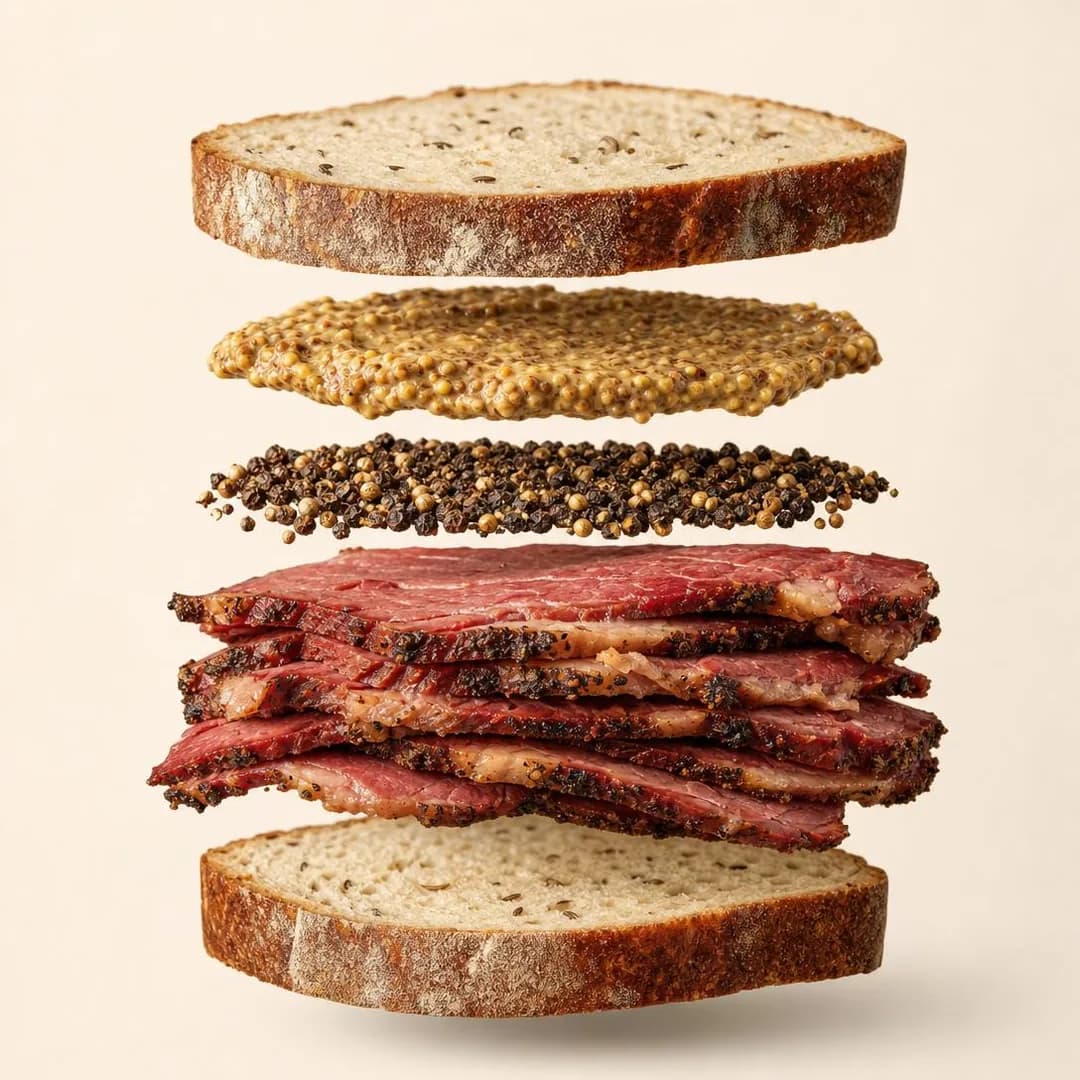
Product & Mechanism · 1:1 · Awareness
Hand-Crushed Coriander & Pepper Bark
Written for: People who once ate a real pastrami sandwich somewhere else.
How this one was made →
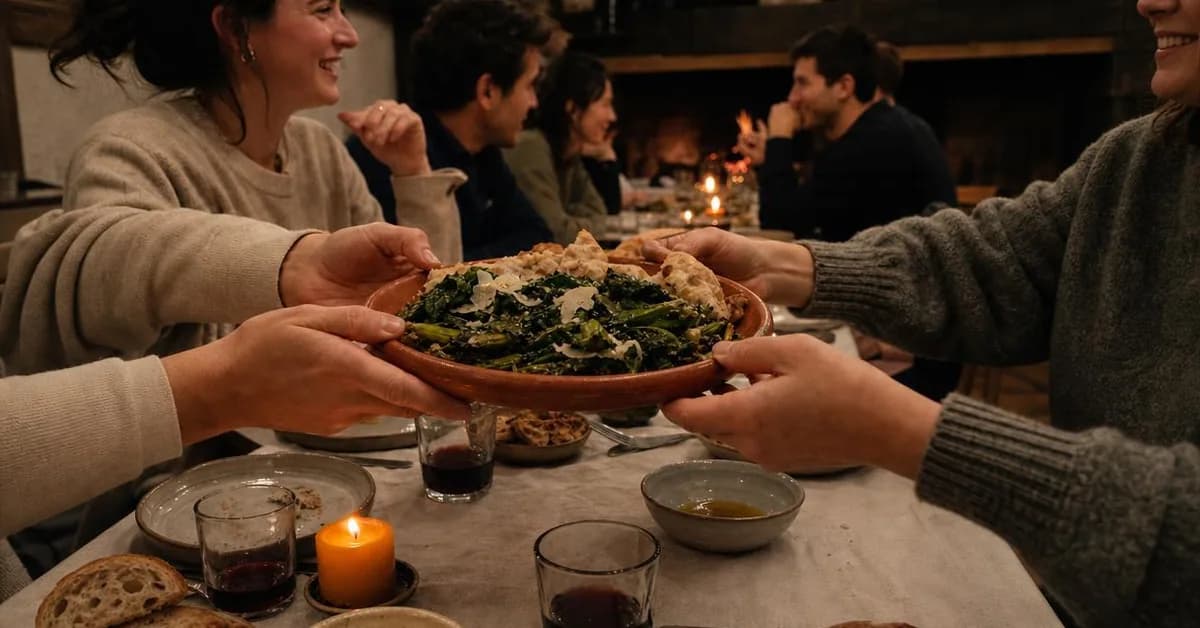
Identity & Emotion · 1.91:1 · Engagement
Stop Nodding. Start Talking.
Written for: People who moved to the neighbourhood and still know nobody on their street.
How this one was made →
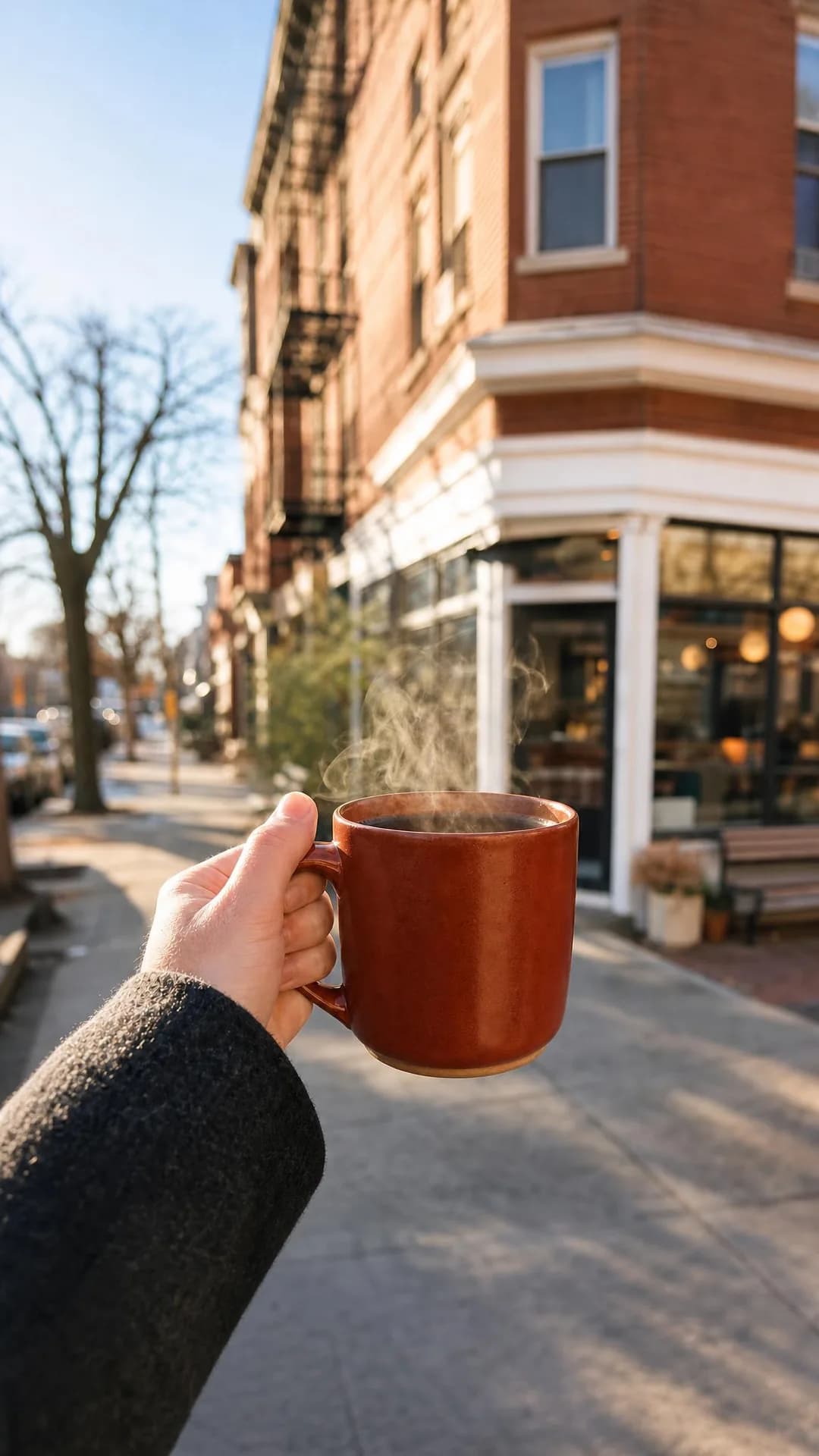
Offer & Economics · 9:16 · Sales
$30/Month. Coffee Every Morning.
Written for: People who buy a coffee on the way to work most mornings.
How this one was made →
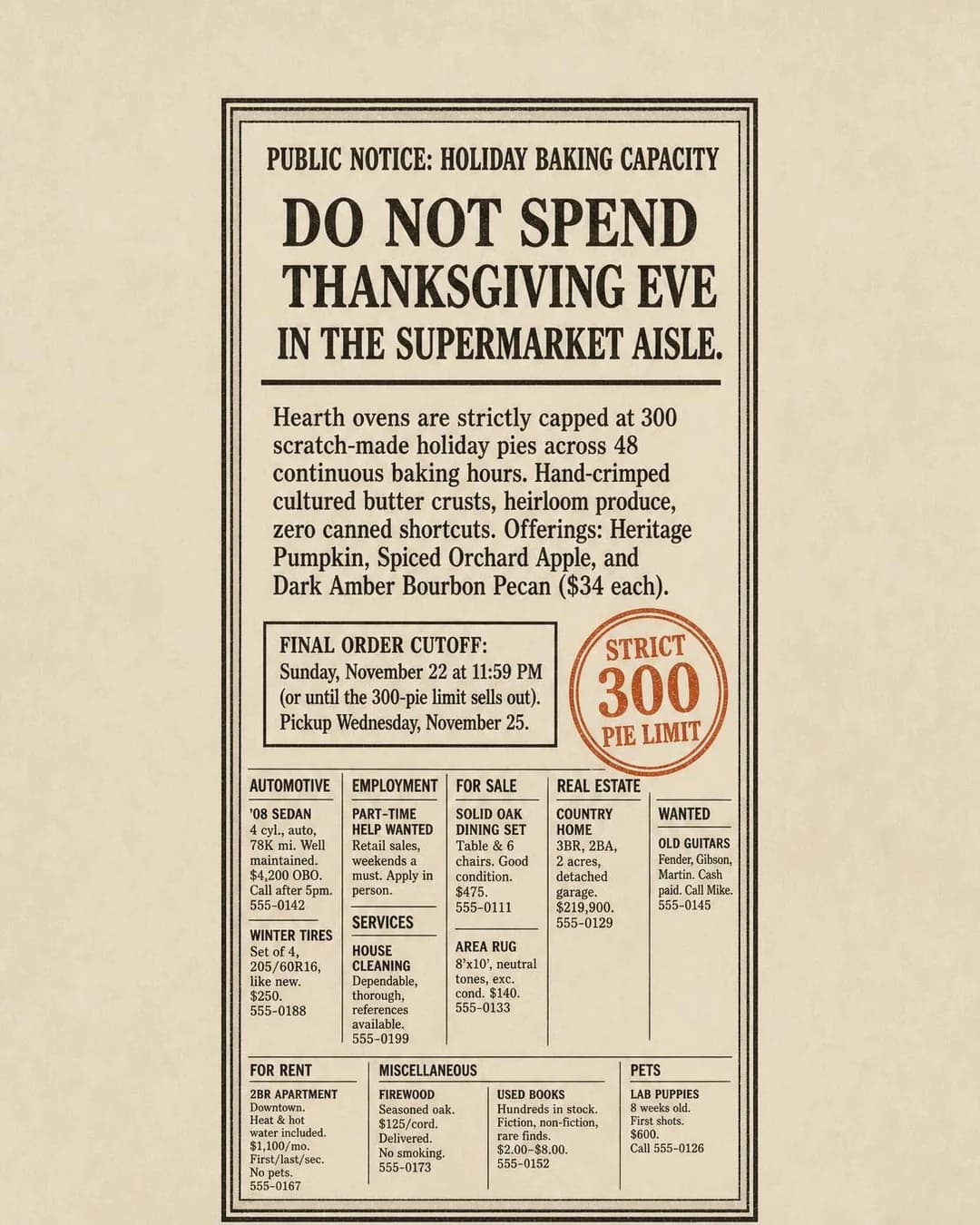
Scarcity, FOMO & Timing · 4:5 · Sales
Skip the Dented Grocery Pies
Written for: People who ended up with a supermarket pie last year.
How this one was made →
Restaurant offers to point it at
Thirteen, from the Facebook guide, running from the sales Meta cannot see to the ones it can. Do not run thirteen. Pick the two or three that sell capacity you have spare, such as an empty Tuesday or an oven that could bake another hundred pies, and type the one you want into the Emphasize box when you start an ad. Each links to its row in the guide: who it is for, the argument that wins it, and the objective to buy it with.
- One dish, to the people who can walk to it
- Why your prices are what they are
- Your own reviews, quoted exactly
- A gluten-free or allergen-safe kitchen
- A waitlist you join from home
- A supper club, a quiz or a tasting menu
- Pickup priced below the delivery app
- A coffee club, a bread share or a lunch pass
- Holiday pre-orders with a real cap
- Gift cards in the last week before the holidays
- Office catering, delivered and laid out
- Private dining and party bookings
- Custom and celebration cakes
Our examples repeated their menus faithfully, mistakes included. The picture is where they added and dropped things nobody asked for.
In most trades an invented detail is a claim somebody might check. In a restaurant it can be an order placed the same evening, to a server who has never seen the ad. So before an ad runs, read it the way your staff will be asked about it:
1. Every food and drink in the picture, and every dish word in the copy, against your menu.
2. Every word printed in the frame, down to the filler around a notice.
3. Any glass. In the United States a picture of people drinking makes an alcohol ad, which must reach only people 21 and over.
4. Every name, face and review.
5. The hours.
6. The one number the ad rests on.
Then show it to whoever works the floor before you switch it on.
Our ten restaurant examples show why each item is on that list. They had no websites behind them. A model wrote each invented restaurant a business summary from a one-line brief, standing in for the site you would paste, and the stages after it ran as they run for you, except that we chose each ad's audience, angle, objective and style ourselves. Compared with those summaries, the ads show two things.
First, they repeat the summary closely, including what is wrong with it. The bakery's notice carries its three pie names, its $34 price, its cutoff and its pickup date word for word. The burger restaurant's price letter adds $7, $8, $3 and $1 to exactly $19, with no line for margin, because its summary had none. The noodle shop's ad blames the delivery apps for a markup the restaurant sets itself, because its summary did. The coffee club's summary said the membership breaks even in “roughly seven visits” without giving a cup price, and the ad printed “Pays For Itself by Visit 7” as a headline; one primary text worked it out from the $3.25 a cup in the audience line we had written and got the tenth visit, which is right. When two inputs disagree, the ad prints both. Close is not perfect, either: the supper club's “more than half arrive alone or in pairs” became the headline “Over Half of Us Arrive Solo”.
Whatever your site says, your ads will say, a little louder. Read the business summary as if it were ad copy before you approve it, looking hardest at break-evens, price breakdowns, claims like “never frozen” and any line that blames someone else for a price. It stays editable in your brand settings, so change it whenever the menu changes.
Second, what the ads added, they mostly added in the picture, and each case we traced first appears in the step that writes instructions for the image. The deli's summary said its sandwich was meat, rye and mustard, “nothing else”. That step asked for “a distinct, floating crust layer” of cracked peppercorns and coriander, and the picture has a layer of loose whole peppercorns between the mustard and the meat. It signed the burger letter “— Sam”, an owner the summary never named. It set the pie notice in a page of classifieds, and the listings drawn around it include a help-wanted ad and two homes, although employment and housing are Meta special ad categories and a pie ad needs neither. It filled the Thai restaurant's review grid with four reviewers who do not exist, with faces and Google's “Local Guide” badge; the FTC's rule on consumer reviews, in force since 21 October 2024, prohibits a review that misrepresents that the reviewer exists.
The same step also drops things. The caterer's summary promised allergen cards naming each dish and all nine major allergens; the step asked for cards reading “DAIRY-FREE” and “NUT-FREE”, so the tahini on the tray has no card mentioning sesame. And the pie notice lost the pickup window, 7 a.m. to 6 p.m., which the summary gave and no line of the ad repeats.
Drink is the addition that changes who may see the ad, and in our examples it came off the menu. Both ads that came back with wine were for restaurants whose summaries sold wine. The step that set the supper-club table with a crock of the menu's butter set it with “low glass tumblers filled with house wine” in the same breath, listed together as “realistic dining ephemera”. To Meta, showing the “consumption of alcohol beverages” makes it an alcohol ad, and the publisher does not look at the picture, so the ad goes into whatever age range the ad set has. Look for a glass in every dinner scene, expect one if your menu sells drink, and give the bar its own 21+ ad set.
Each kind of mistake has its own fix. Wrong or stale facts are fixed in the business summary, before the next ad. Words in the copy are edited in place before you publish. Anything inside the picture, including the text on a notice, a letter or a card, which half of our ten ads carry, can only be changed by drawing it again: in the step-by-step path, edit the square with a sentence before the other sizes are made from it, or generate again. And for the dish itself, add your photos, so the picture is drawn with your plate as its reference. We have not yet published a restaurant batch made with photos, the Emphasize box or the one-sentence edit, so none of them replaces the check.
The alcohol, allergen and review rules on this page are United States rules, and your state, city or country adds its own. None of this is legal advice.
Questions
- Can AI make ads for my restaurant?
- Yes. Paste your restaurant, café or bakery website and it reads your menu, your hours and whatever you sell online, shows you what it learned so you can correct it, then writes a concept, draws the image in four sizes for Facebook and Instagram, and drafts five headlines, five primary texts and a description. What it gets wrong is predictable enough to check for. Our published restaurant examples repeated their menus faithfully and added things to the pictures that nobody asked for, like a layer of loose peppercorns in a sandwich and wine on a supper table. Every ad lands paused, so nothing runs until you have looked.
- Does it work for cafés, coffee shops and bakeries, or only restaurants?
- It reads a café, coffee shop or bakery the same way: menu, hours, and whatever is sold on a screen. For a café or bakery, the ads Meta can measure are usually sales that happen online: a coffee club or a lunch pass, holiday pre-orders with a real cap, gift cards. Custom cake orders are inquiries, and the guide covers the Instant Form for them. Two of the four ads on this page were made for a café and a bakery.
- Will it read my menu if it's a PDF or on my online ordering page?
- Yes, as long as the menu is text. Add the menu's own link beside your homepage during setup: it takes more than one link, keeps every page you name, and reads a PDF link as text. A menu that exists only as a photo, such as a picture of the chalkboard, gives it nothing to read. In that case, type the dishes you want advertised into the business summary it shows you before any ad is made.
- Can I use my own food photos in the ads?
- Yes, as the reference for a new picture rather than as the picture itself. Add the dish under “What are we advertising?” with up to six photos, from the angles you want shown, and pick it before you generate. The AI draws a new image built around your plate as photographed, and is told never to show it from a side your photos do not show. The layer of peppercorns in our deli ad was written by exactly the step that instruction constrains. We have not yet published a restaurant batch made with them, so check those pictures against the plate too. The photos on your website set the colours and style but never appear in the ads.
- Will it post ads or spend money without me?
- No. It publishes into an ad set you choose in your own Meta Ads Manager account, and every ad lands paused. It never creates campaigns or ad sets, never edits ads you already have and never spends budget. Nothing runs until you switch it on in Ads Manager, which is where the check against your menu belongs.
- I've never used Ads Manager. Can I still use this?
- Yes. You can generate, edit and download everything without it: Download all saves the images and Copy all the text. To publish from here you need a campaign and an ad set in your own Ads Manager account, because it will not create them, and the ad takes that ad set's age range and radius. The Facebook guide works out the objective, the radius and the age range for a restaurant.
- Can a restaurant ad send people to my door or get them to call?
- Partly. Every button our publisher offers opens a web page: Learn more, Shop now, Sign up, Subscribe, Get offer, Contact us, Download and Book now. For a dine-in ad, Learn more to a page with your address and hours publishes directly, and it is the pairing our examples page gives the deli's sandwich. The Facebook guide recommends Get directions under the Awareness objective, or Call now in the hours someone answers the phone, and the publisher offers neither. For those, download the images, copy the text and build the ad in Ads Manager, where both buttons are.
- Can I see what it makes for a restaurant before signing up?
- Yes. The restaurant Facebook examples page has ten finished ads published as they were generated, for restaurants, cafés and bakeries that do not exist, each with the audience, angle and objective it was written for. Nothing was retouched; three re-frames were redone once because of a bug in our re-frame instruction, and the page says which. The flaws are named rather than cropped out: the layer of peppercorns, the two ads that came back with wine, the break-even printed two ways, and a grid of reviews from people who do not exist. Four of the ten are on this page.
Not ready to generate anything yet?
- Facebook ads for restaurants, cafés and bakeries → the playbook: objectives, offers, targeting and the mistakes specific to this trade.
- Instagram ads for restaurants, cafés and bakeries → the playbook: objectives, offers, targeting and the mistakes specific to this trade.
- Restaurant Facebook ad examples → every ad above and the rest of the batch, each with the audience, angle and objective it was written for.
- Restaurant Instagram ad examples → every ad above and the rest of the batch, each with the audience, angle and objective it was written for.
Enter your restaurant, café or bakery website
Your website is the whole brief. If your menu is a PDF or lives on your online ordering page, you can add that link during setup, and you will see and correct what it learned before any ad is made. Every ad lands paused, which in this trade is where somebody holds the picture up against the menu.