
Ad Guides · Restaurants, Cafés & Bakeries × Instagram
Instagram ads for restaurants, cafés and bakeries
The reminder Instagram gives away on a post and sells as an ad, and when the ad is worth it; ads that run only at lunch or after midnight; and whether your profile's one button says Reserve or Order food. A playbook for a restaurant, café or bakery on Instagram, with every platform claim sourced and dated.
Before you pay for an Instagram ad that reminds people of anything, notice that Instagram will send a reminder for nothing. A professional account can add one to a new feed post: an event title, a start time, and a bell in the corner of the post that anyone who sees it can tap. The paid version is the reminder ad. It runs only on Instagram, it is the one ad format Meta documents for setting a reminder, and our restaurant Instagram examples are built around it. So the first question for a restaurant's Instagram ads is not how to build a reminder ad. It is what the ad does that the post can't.
The answer is two things, and most of this page follows from them. The ad reaches people you choose, beyond whoever your posts reach. And only the ad can remind people after the start, a day or a week later, which is the reminder an opening needs for the people who miss the first day. Whether an offer deserves a reminder at all comes down to one test: is the moment the notification fires a moment you can take the sale? For a table release at 10 a.m., a bake whose doors open at 8 or an opening day, it is. A class fails it, because the seats are sold before it starts, and a dinner you serve every night has nothing to announce.
Everything without a start time runs on the week instead: a lunch counter's late morning, a late kitchen's small hours, a Sunday order cutoff. Meta sells two controls for that, and which one you get depends on the budget you pick. One switches an ad off outside the hours you choose; the other spends more inside them. Behind all of it sits your profile, which Meta sells visits to as an ad of their own and which can show a single action button: Reserve or Order food, through a partner you already use.
Two limits run under all of it. A reminder set is a promise, not a guest: Meta counts the people who asked to be told, not the ones who came. And a reminder does not bake more pastries. If a Saturday tray of 120 sells out before 9:30 anyway, as the invented bakery in our examples does on 51 Saturdays out of 52, a reminder ad mostly changes who gets them. That can still be worth paying for, and the budget section shows when.
What follows is the rest of an Instagram ad strategy for a restaurant, café or bakery: which objective to buy, which offers get a reminder and which get a schedule, the settings for each, the budget, and how to count what a reminder is worth. Where our Facebook guide for restaurants has already worked something out (the radius, uploading seated parties from your waitlist, catering forms, the pixel on your ordering page), this page links to it instead of repeating it.
The ads here are real output rather than mockups drawn for the argument. All ten from the restaurant Instagram examples page appear in the offer table and eight are shown in full, published exactly as generated for restaurants that do not exist. Every date and price in them is invented. Several went wrong in ways this page uses: a baker's log that records the very bake its ad announces as already sold out, six dumplings drawn as eight, an order-ahead shelf that became an office desk, and two start times that vanished from every version of the copy.
It is not legal advice. The alcohol, personal-attribute and hiring rules below are Meta's and the United States', and your state, city or country adds its own. Nor is it a benchmark report: there is no cost per reminder or per profile visit here, because the useful version of either comes from your own account.
Generate Instagram ads for your restaurant, café or bakery
Paste your site and best-in-slot reads it (menu, hours, what you sell and when), shows you the business summary it wrote before any ad is made, then writes the concepts, draws the images in all four sizes and drafts the copy. It cannot attach an event, so for a reminder ad download the images and text and build it in Ads Manager. Check every date, hour and count against your own. Free to start, no card.
What Instagram changes for a restaurant: reminder posts, reminder ads and one profile button
The reminder post comes first because it is free. From a professional account, tap Add reminder while creating a new feed post, then give the event a title, a start time and, if you like, an end. People who see the post can tap the bell in its bottom-left corner. Instagram then sends them an activity-feed notification 24 hours before, and an activity-feed notification plus a push notification 15 minutes before and again at the start. The post has to go up at least an hour and at most three months ahead, and you can share it to Stories. It reaches whoever your posts reach.
The reminder ad is built in Ads Manager, where every ad sits at three levels: a campaign holds the objective, an ad set inside it holds who sees the ad, where and when, and the ad holds the picture and the words. Meta's help centre documents one route.
For the campaign, choose the Engagement objective, On your ad as the conversion location, Reminders set as the engagement type and Maximize reminders set as the performance goal, which is the result Meta's delivery system tries to get more of.
For the ad set, the placements are Instagram Feed, Stories and Reels, the only ones it runs on, and the end time is an hour before the event.
For the ad, add an image or a video and a call-to-action button from the usual options; Remind me is selected as the destination, you can add a link as well, and you pick an event you created before or make a new one with a name, a start date and time and an optional end. People can set the reminder from the ad or from the page it opens in Instagram's browser.
The two are not the same reminder. The post sends its three notifications to the people who tapped its bell. The ad sends one a day before and one at the start, plus a single extra you choose: 15 minutes before, or 1 to 7 days after. Meta's reminder-ad pages do not say whether those arrive as push notifications or in the activity feed, or whether someone who sets both reminders hears twice. So the ad buys two things the post cannot. It reaches people you choose, beyond whoever your posts reach. And it can remind them after the start, which an opening needs for the people who miss the first day and a season needs for the people who miss the first weekend. The post's last notification is at the start. The two sit side by side at the top of the targeting table below.
What the documented ad cannot do is limit how often one person sees it. A frequency cap can be set only where Reach or ThruPlay is the performance goal, and Maximize reminders set is neither. Meta's developer guide also lists a reminder ad under Awareness optimised for Reach, but that is a Marketing API route the help centre does not document for Ads Manager, and nothing we read says whether a cap works on it.
Our own product cannot build a reminder ad either: best-in-slot publishes into an ad set you have already made, with one of eight buttons that each open a web page, and it cannot attach an event. Every reminder ad on this page is an Ads Manager build.
A reminder ad also lasts only as long as its event. Meta's developer guide says it “will stop delivering once its event is in the past”, and Meta asks you to end it an hour before the start anyway. A bake that happens every Saturday needs a new event every week, and a monthly table release needs twelve a year.
Offers without a start time run on the week, and Meta sells two controls for that. Both can be set on the ad set, and neither is Instagram's alone. One silences an ad outside its hours; the other turns it up inside them.
Ad scheduling switches an ad set off outside the days and hours you choose, and Meta's scheduling documentation says to use it only with a lifetime budget, one total for the whole run. Budget scheduling keeps the ad set running and spends more in high-demand periods you choose, and Meta's help centre says it works only with a daily budget, an amount per day.
A late kitchen, whose offer means nothing at noon, wants the first. An order-ahead shelf, which needs orders all week for Meta to learn from and likely takes most of them in the hours before the cutoff, wants the second. The limits of each are in the targeting table below.
Then the profile. Meta sells a visit to it as an ad in its own right: profile visit ads run under Traffic with Instagram profile as the conversion location, show a Visit Profile button and optimise for visits. And the profile can show one action button at a time. Instagram offers three to businesses, Book now, Reserve and Order food, each only through a partner you already have an account with. For a restaurant that makes the button a choice between your tables and your kitchen, which the destination section works through.
Which Instagram ad objective to buy
The objective belongs to the campaign, not the app, so the Facebook guide's rule stands for most restaurant offers: choose it by where the sale happens. Instagram changes two rows. Engagement, which on Facebook buys a restaurant event responses, becomes the home of the reminder ad and one of the ways into Instagram Direct messages (Leads is another). And Traffic gains a destination the Facebook guide never needed, your profile.
So ask one question before that one. Does the offer have a start time worth a notification? If it does, post a reminder for it, and consider an Engagement reminder ad on top. If it doesn't, ask where the sale happens.
At your table or counter, buy Awareness, with Reach as the performance goal and a schedule if the offer only exists at certain hours. On your own ordering page, buy Sales. On a page or a profile the reader has to see first, buy Traffic. In a conversation about a cake or a room, buy Engagement or Leads, into Instagram Direct.
- AwarenessDefault
For what is eaten at your table or bought across your counter and has no start time worth a reminder: the lunch dish, the late kitchen. Reach as the performance goal, because only Reach and ThruPlay take a frequency cap, and ad scheduling on a lifetime budget if the offer only exists at certain hours. Judge it on the till, as the Facebook guide explains.
- EngagementSometimes
For an offer with a start time worth a notification, where the free reminder post is not enough: an opening, a season's first morning, a table release or a bake whose newcomers are worth paying for. Also one of the objectives that can send a tap into an Instagram Direct thread, through Messaging apps. Never for likes.
- SalesSometimes
For what is bought on your own ordering page with Meta's pixel on it, the tracking code that reports each order back to Meta: an order-ahead shelf, a family meal with a cutoff, a pre-order. Prefer budget scheduling to ad scheduling here. An ad set usually leaves Meta's learning phase only after about fifty results in a week, and switching it off for most of the week gives it fewer.
- TrafficSometimes
For a page the reader has to see before they will come, such as the menu with the dish photographed or a class's booking page, and for your profile, bought as profile visits. Buy the visit only if the top of your grid works as a menu: the dishes, the room, the hours.
- LeadsRarely
Office catering still belongs on an Instant Form, Meta's own lead form, with a date question and a headcount band, and the Facebook guide builds one. Leads also lists Instagram as a conversion location, another way into Direct messages for a cake or a private dinner.
- App promotionNo
A chain with its own ordering app is the exception. For one restaurant, send people to the menu rather than to an install.
What to advertise on Instagram, and whether it needs a reminder or a schedule
The rows below are sorted by timing, because on Instagram the first decision about an offer is when its ad should reach people. The table release, the weekly bake, the opening and the season have a start time worth a notification: post a reminder for each one every time, and buy the reminder ad only where the budget section's sum says it pays. The class has a date and should not get a reminder. The lunch dish, the late kitchen, the shelf and the family meal run on the hours of an ordinary week and get a schedule. The vegan bowl and the cake conversations have no start time, though the Direct ad should run only when somebody can answer.
Each row pins who the offer is for, which angle family argues it (each is a page in our library of ad angles), which objective buys it and, where the examples page has one, the finished ad. All ten ads from that page appear once. The objective printed on an example's card is the one it was generated with; the row's objective is the one to build it with, and where they differ, follow the row.
A monthly table release, at the minute it opens
Engagement- Who it is for.
- People who tried three times to book, each time a few days after the tables went up.
- Angle.
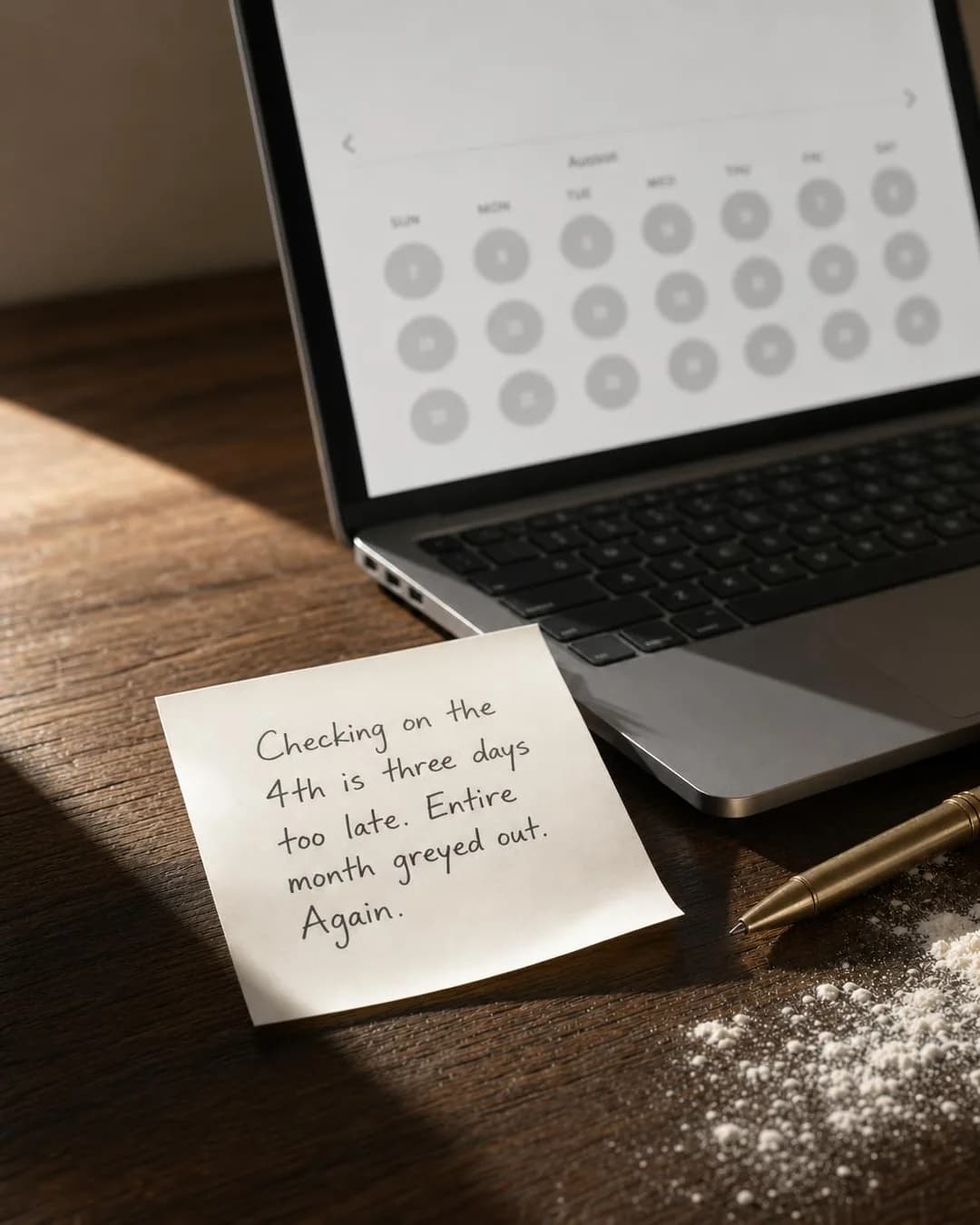
- Problem & Pain — Their problem is the calendar, and a reminder fixes exactly that. Set the event's start to the release, 10:00 a.m. on Thursday 1 October in the example, with the extra reminder 15 minutes before, so the reminder arrives at 9:45 with the booking page about to open. A reminder fills no extra table (the example's last six releases each filled within a day), so post it free every month and buy the ad only for the newcomers the budget section says are worth it. When the ad ends, an hour before the release, start an ordinary Book now ad at 10:00 for whatever is left.
 Example adMissed the drop again?See the brief →
A bake that sells out, every week
Engagement- Who it is for.
- People who heard about the Saturday pastry, arrived at ten and found an empty tray.
- Angle.
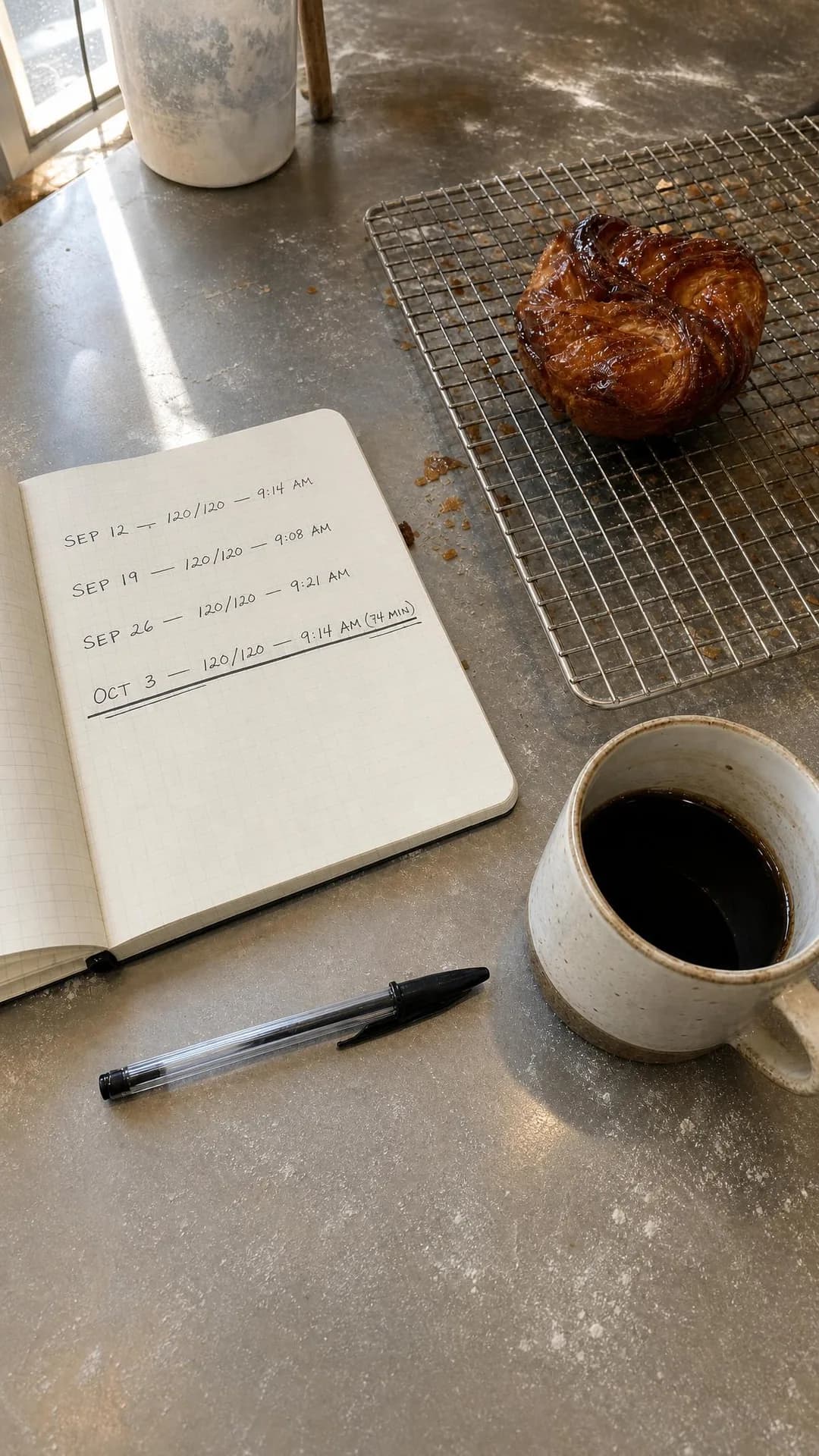
- Proof & Trust — The sell-out is the proof: 51 of the last 52 Saturdays gone before 9:30, in the example's brief. It is also the reason to think before buying, because a reminder ad adds no pastries, and each one a newcomer gets is one somebody else, often a regular, doesn't. A 15-minute reminder helps only people who can reach the counter before the tray empties; for anyone farther away the day-before reminder is the one that works, so keep the ad's radius to people who can make the trip. Post the reminder every week, which means a new event every week, and buy the ad for the Saturdays you want new faces.
 Example adSold Out 51 of Last 52 WeeksSee the brief →
An opening, or a second location
Engagement- Who it is for.
- Regulars who have driven across town for years, and neighbours of the new address who have never been.
- Angle.
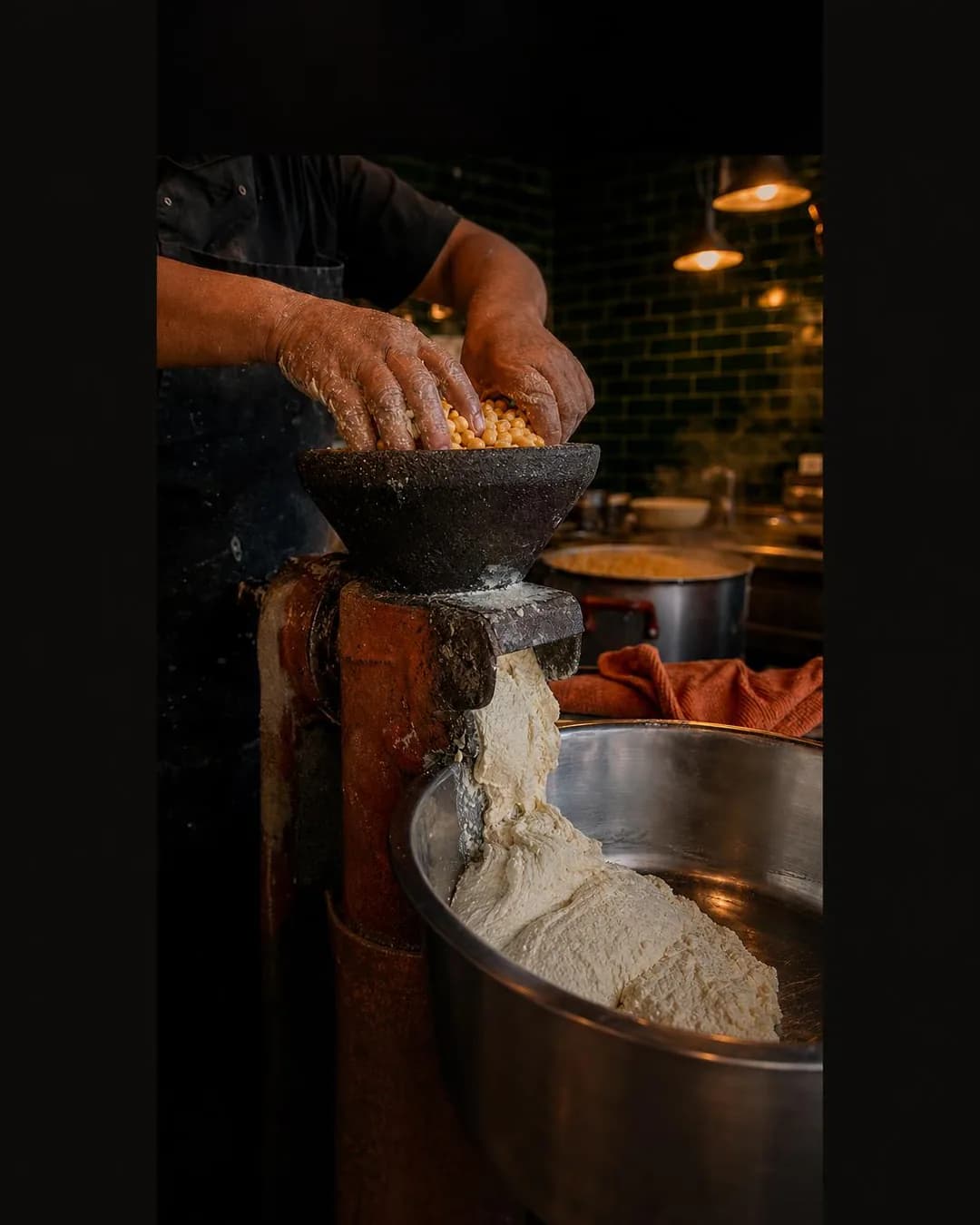
- Story & Founder POV — Show how the food is made, so regulars believe the new kitchen makes it the same way, and put the new address in the frame. Of the dated examples, this is the one where a reminder most clearly adds sales, because a new room has no line yet. Choose the extra reminder a few days after the start. The post cannot send that one, and your regulars are the people it is for, so keep them in the ad's audience. Then let an ordinary ad carry the first weeks. Cut the example's first line, which tells readers how long their commute is: an ad that seems to know where you live reads as surveillance.
 Example adCut Your 25-Minute Drive to 10.See the brief →
A seasonal bake, from its first morning
Engagement- Who it is for.
- People who found the good bakery sold out the weekend before Día de los Muertos last year.
- Angle.
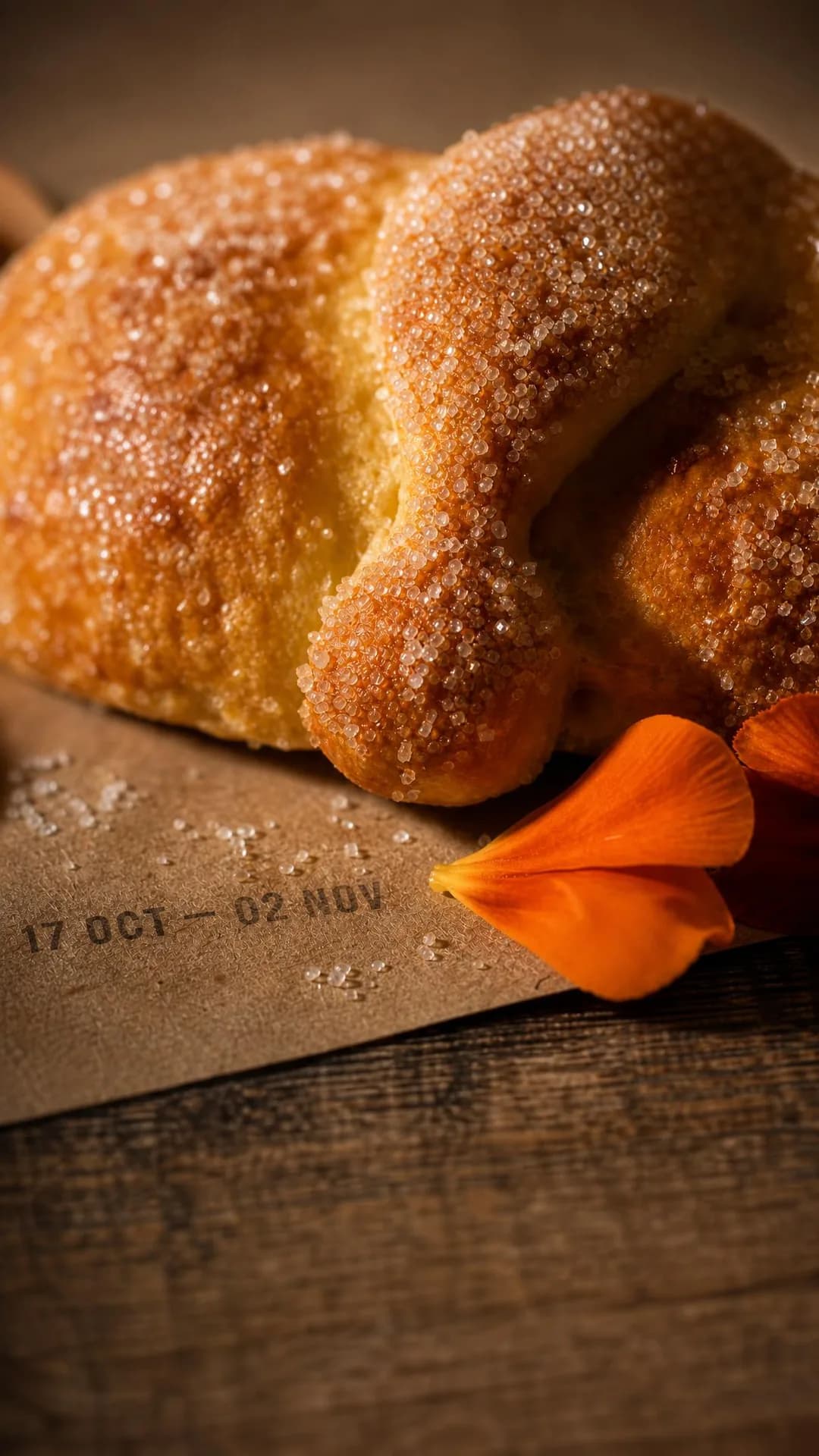
- Scarcity, FOMO & Timing — The calendar is the limit, which makes the scarcity true, but a season has one start time. Set the extra reminder 7 days after the first morning, which in the example lands on Saturday 24 October, the weekend these buyers missed last year, and keep your followers in, because the post cannot send that reminder. Choosing it gives up the ad's 15-minute reminder; the post still sends one to the people who tapped its bell. For the rest of the seventeen days, run an ordinary ad on a daily budget with a high-demand period for the last weekend. Name the food and the dates, never the reader's tradition.
 Example adSeventeen Days Only. Reserve Now.See the brief →
A class or a ticketed dinner: a date, and no reminder
Traffic- Who it is for.
- People who followed three videos, baked two flat loaves and threw the starter away.
- Angle.
- Objection & Risk Reversal — The objection is that sourdough is too complicated, and the example answers it on a whiteboard. A reminder's notifications add nothing here that an ordinary ad wouldn't: the one at the start arrives when every seat is sold or will stay empty, and only the day-before one could sell a seat. Run it as Traffic to the booking page in the two weeks before, to people near the bakery, and count the seats; eight seats is at most eight purchases, too few for a Sales ad set to learn from. The example's date survives only in its description line, so put the date and the hour in the picture and the first line.
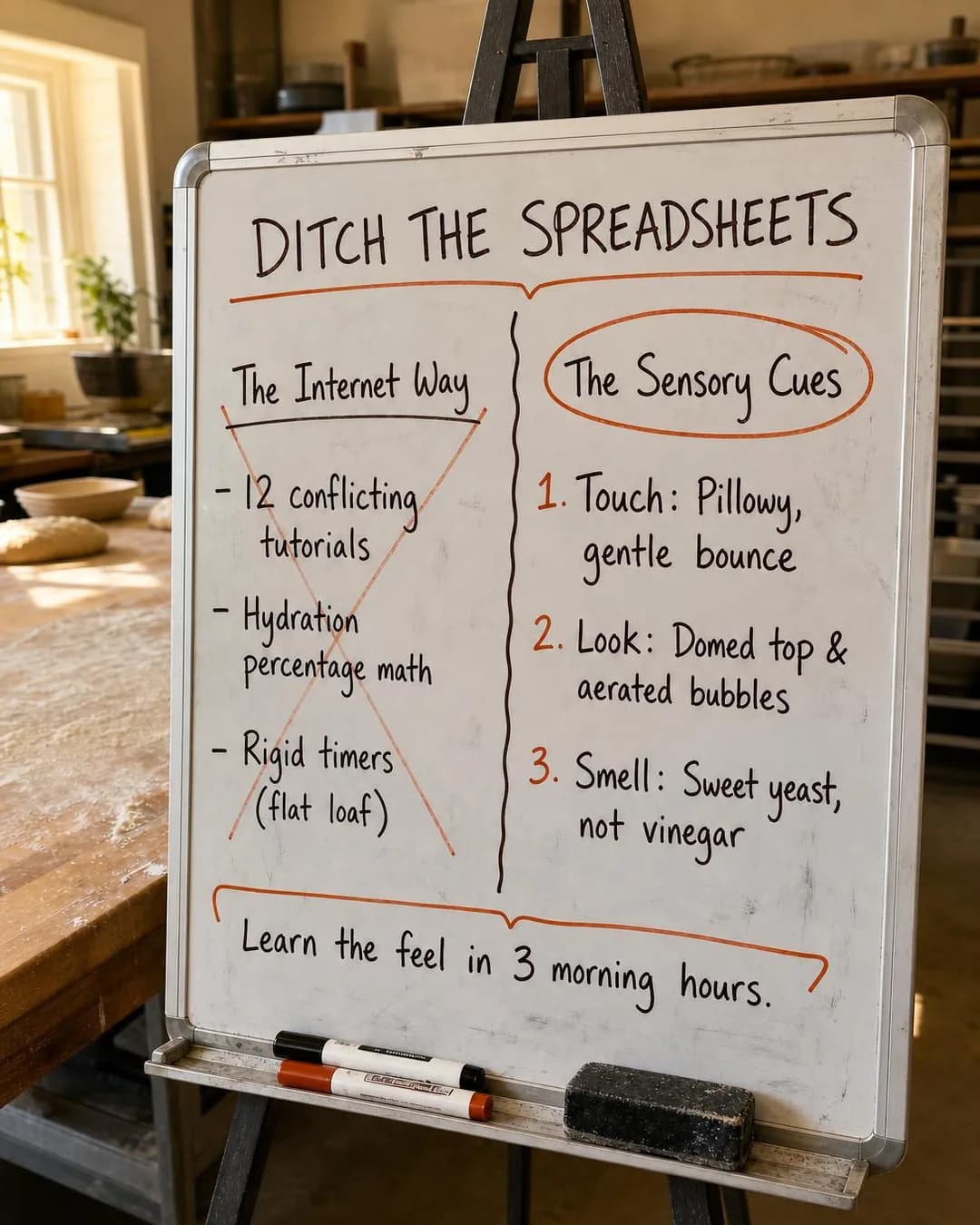 Example adDitch The Math. Bake Great Bread.See the brief →
One dish at lunch, to the people who walk past
Awareness- Who it is for.
- Office workers who pass the window every day and assume there is a line.
- Angle.
- Product & Mechanism — Argue the dish at the level of how it is made, and show the plate the kitchen actually serves. Schedule it for late morning through lunch, say 10 a.m. to 1 p.m., on a lifetime budget, so it is silent the rest of the day. Count the dish in the picture: the brief said six dumplings on a plate, and both sizes show eight in a takeaway box.
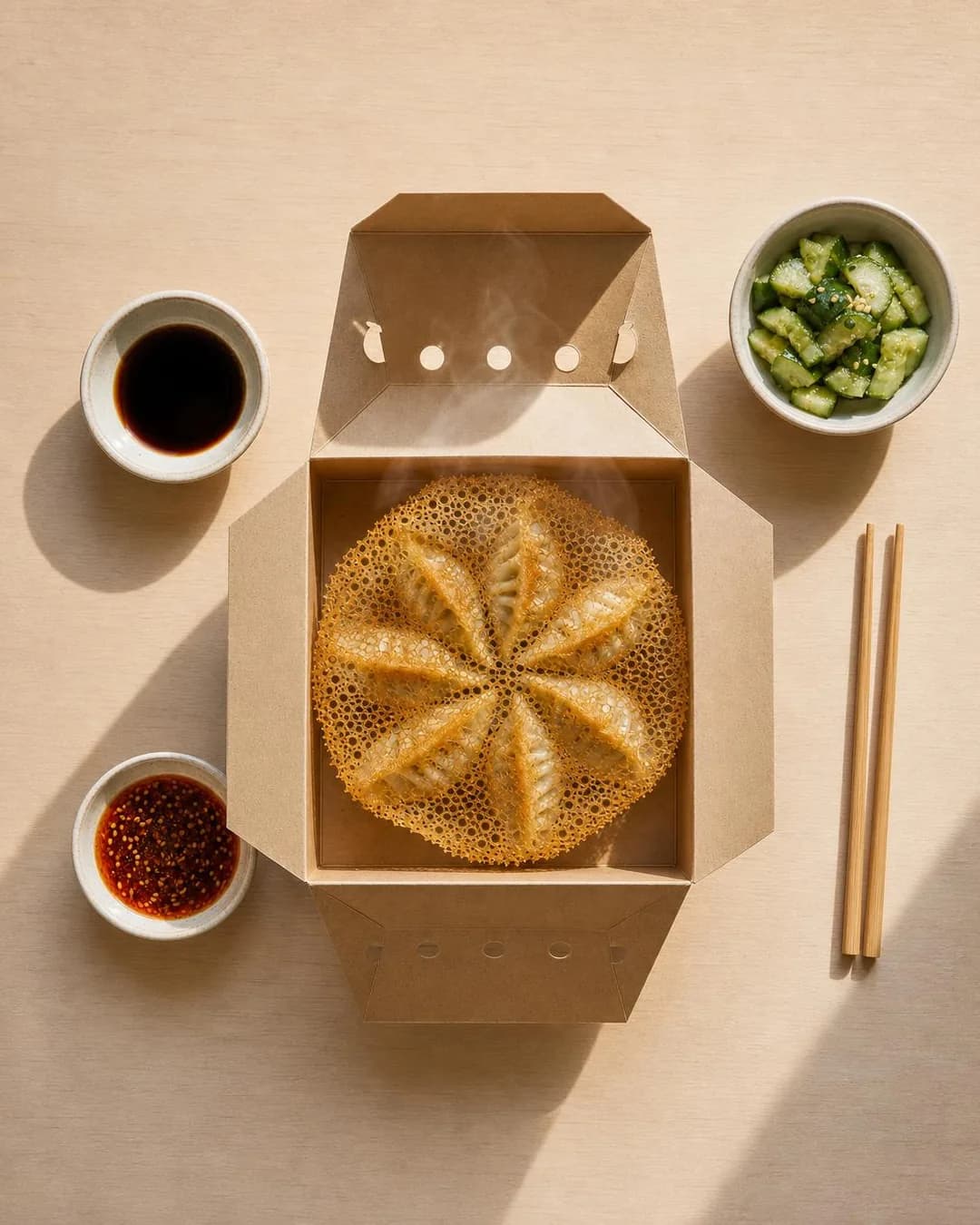 Example adTwelve pleats. Zero par-cooking.See the brief →
A kitchen open after everyone else's has closed
Awareness- Who it is for.
- Cooks, servers and bar staff who finish after midnight.
- Angle.
- Identity & Emotion — Calling the reader by their job is the angle, and a safe one: occupation is not on Meta's list of personal attributes, so naming a job stays clear of that rule. Trade-union membership is on the list, so keep union cards out of any discount. The example kept a different one from its business summary, 15% off with a clock-out slip: run it only if it is a discount you chose. The offer matters after other kitchens close, which makes it the case for ad scheduling, and the night crosses midnight. Each scheduled window belongs to one day, so it is 11 p.m. to midnight on Thursday, Friday and Saturday, and midnight to 2 a.m. on Friday, Saturday and Sunday. Print the closing time in the frame, because Meta says a small number of people could see a scheduled ad after its hours.
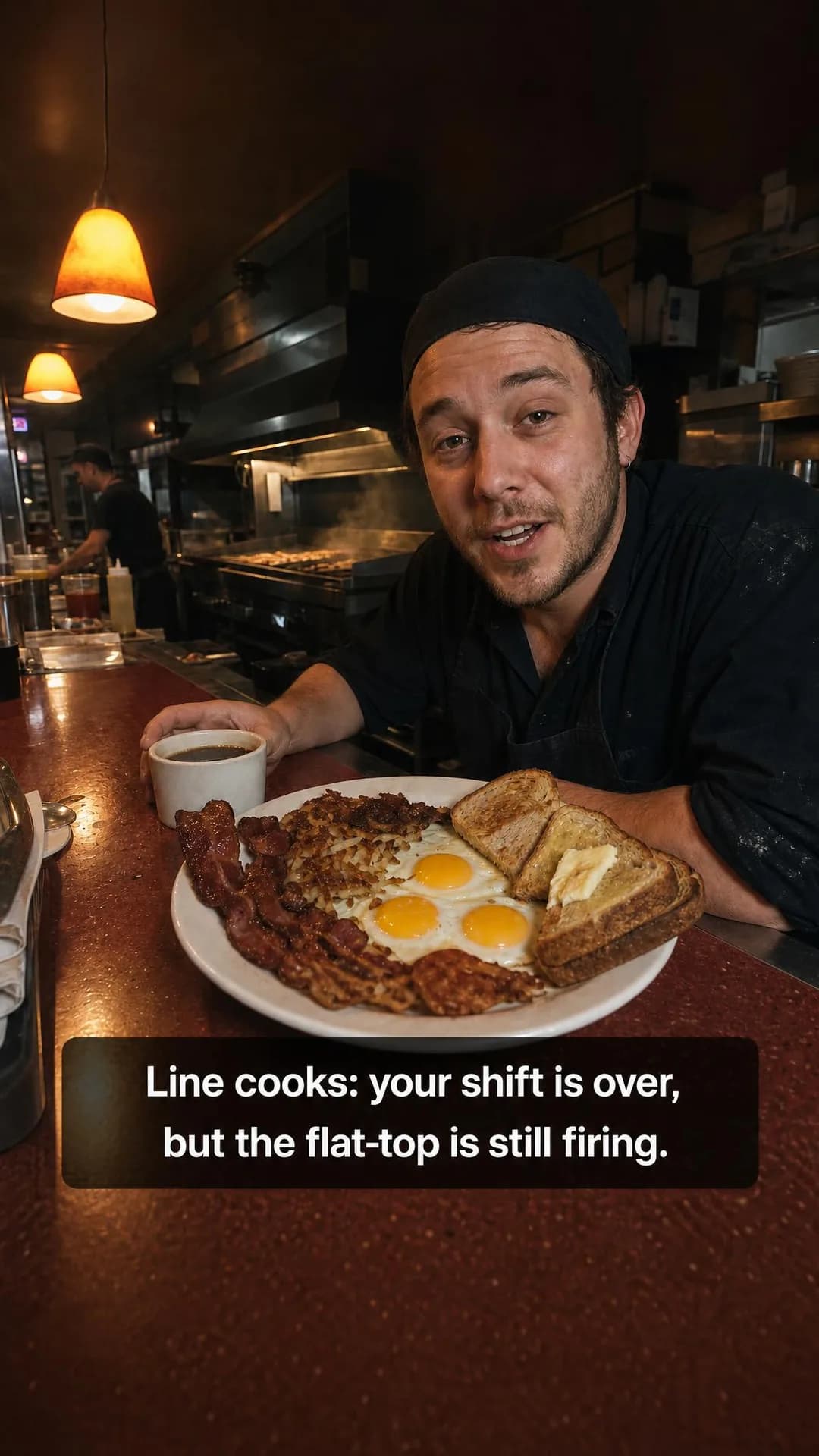 Example adFlat-Top Firing Until 2:00 AMSee the brief →
Order tonight, collect from the shelf tomorrow
Sales- Who it is for.
- Whoever brings breakfast to the Friday meeting and spends twenty minutes of the morning in line.
- Angle.
- Benefit & Outcome — The mechanism is the offer: order by the cutoff, walk past the line, take your named bag off the shelf. Two tools fit it. A Sales ad on your own ordering page, on a daily budget with a high-demand period the evening before the cutoff, sells to people who don't follow you. And a reminder post each week that starts an hour before the cutoff (7 p.m., for the example's 8 p.m.) sends the people who tapped its bell a push at 6:45 and at 7, both while ordering is open. Skip the reminder ad, whose goal is reminders set, not orders. Show the shelf; the example's picture moved the scene to an office desk.
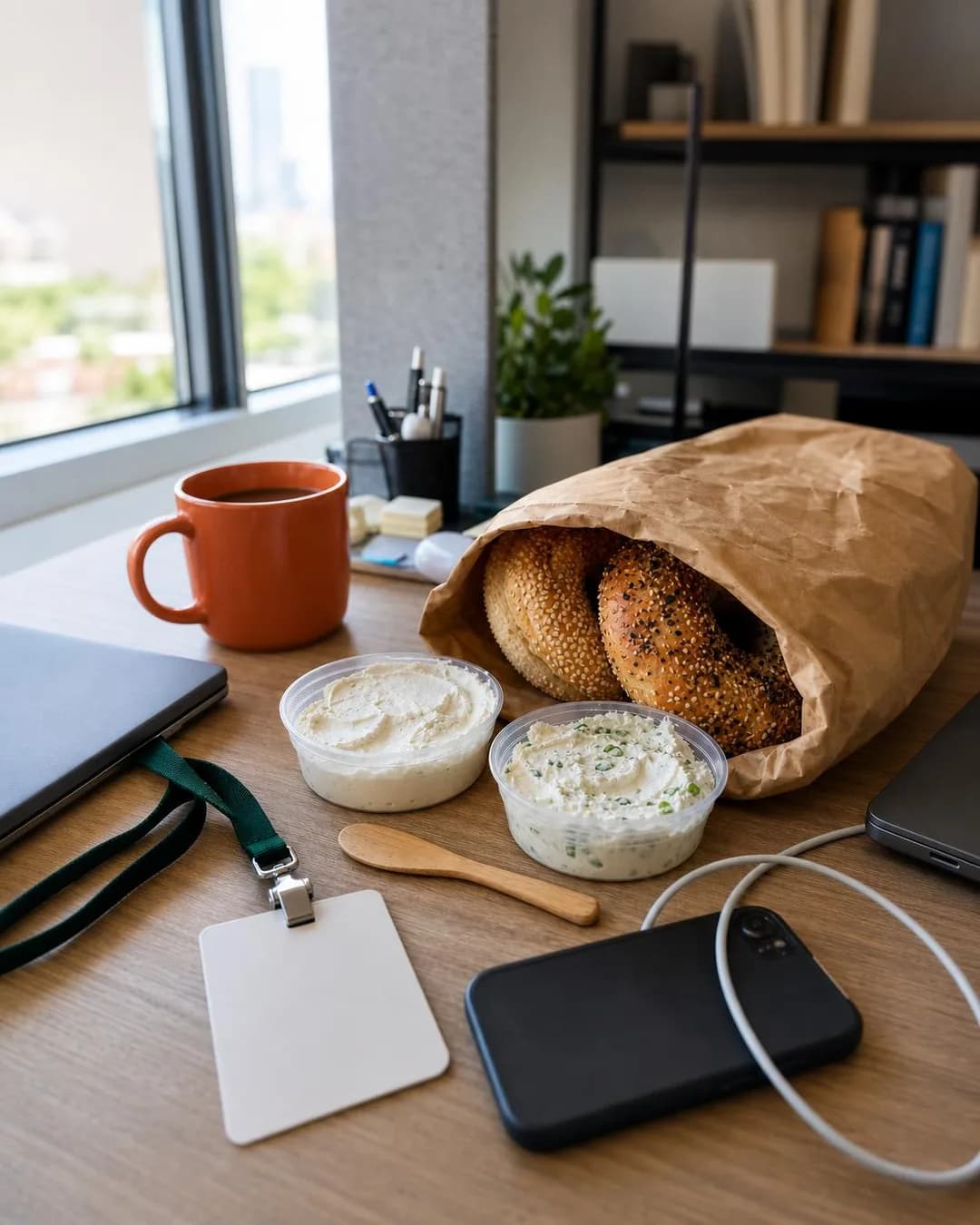 Example adSkip The Friday Bakery LineSee the brief →
A family meal with a cutoff, priced per person
Sales- Who it is for.
- Parents who cook every night except Sunday.
- Angle.
- Offer & Economics — A bundle's job is to make the per-person price the number compared: $42 for four is $10.50 a head. The example's card printed every item, quantity and time as briefed, down to the 3 p.m. Sunday order cutoff. The number the model worked out on its own did not add up: its $65 delivery order needs a $32 tip, so compare against a real receipt or not at all. It takes the same pair of tools as the shelf, a Sales ad leaning into Saturday evening and Sunday morning, and a reminder post that starts an hour before the cutoff.
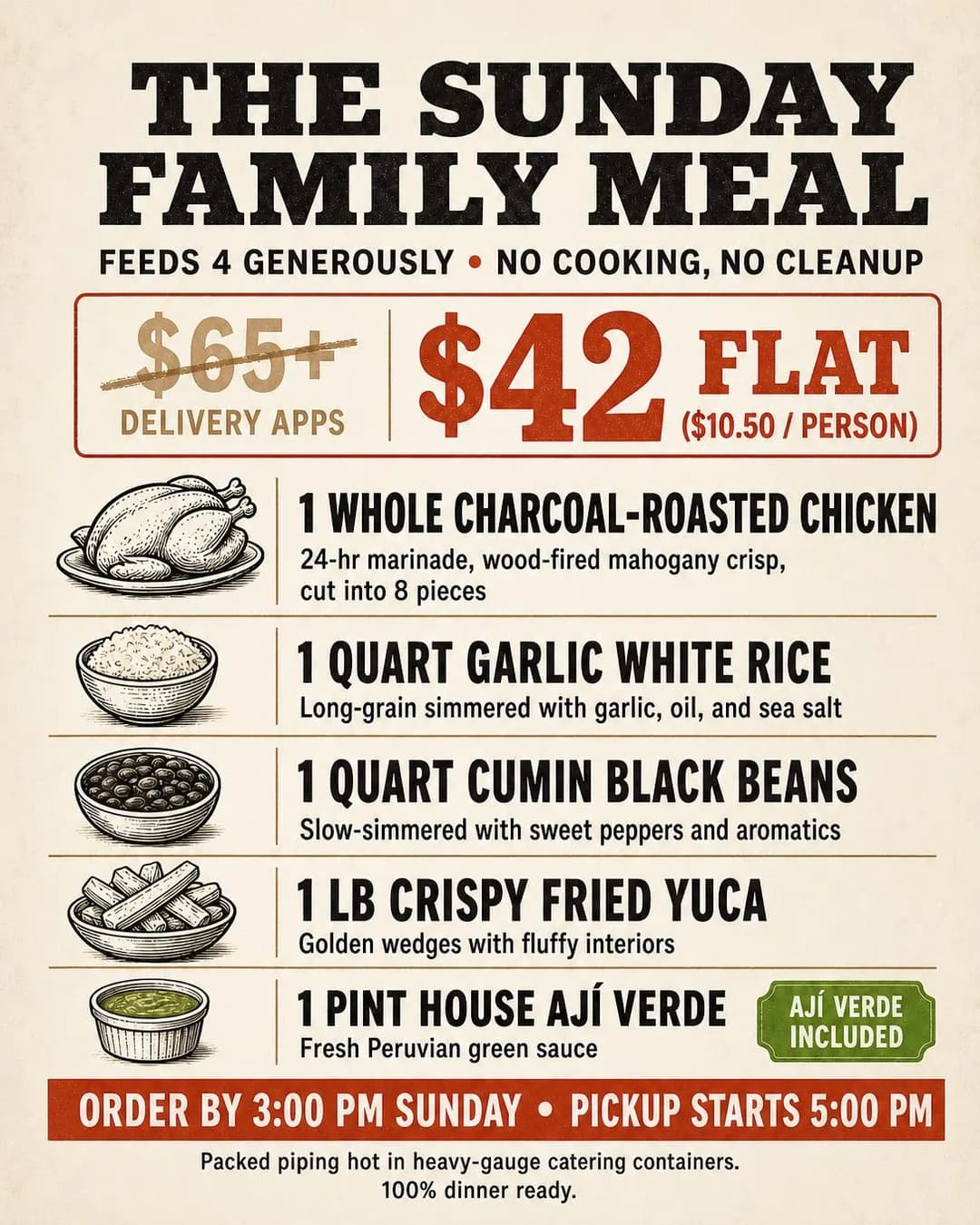 Example adFeed 4 For $42 Flat ($10.50/Person)See the brief →
A vegan bowl, sold to the friend who eats meat
Traffic- Who it is for.
- Ramen regulars who often eat with someone who does not eat meat.
- Angle.
- Comparison & Positioning — The example aims at the meat-eater choosing where two people eat, so the belief worth challenging is that vegan broth is thin. Keep the claim that narrow. The example's copy widened it to every clear broth, shio and shoyu included, and its picture shows a spoon instead of the bowl. Send it to the menu page or the profile where the bowl is photographed. It needs no schedule, because the bowl is the same every night.
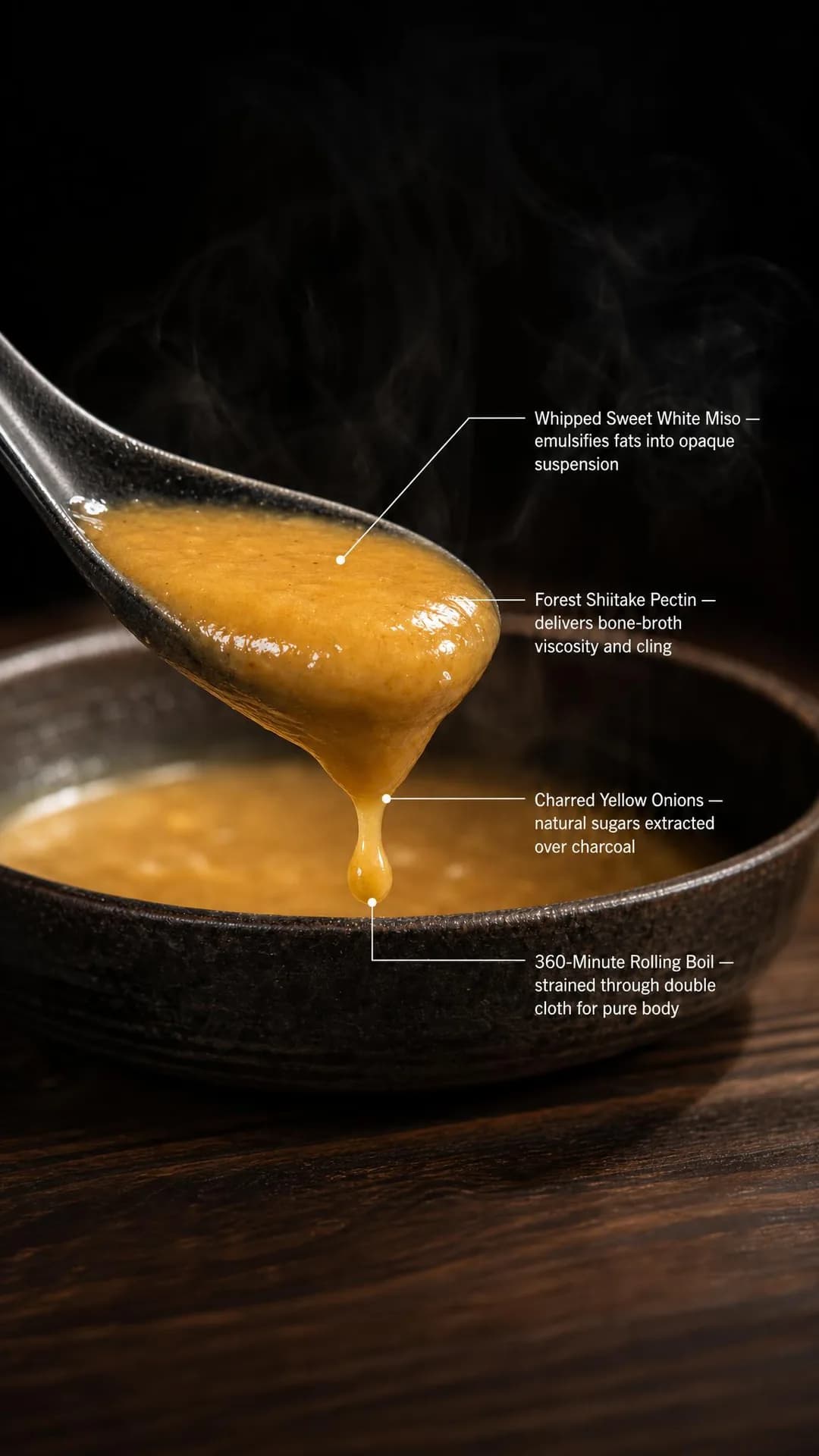 Example adVegan broth shouldn't run clear.See the brief →
Custom cakes and private dinners, in Instagram Direct
Engagement- Who it is for.
- People planning a birthday, a rehearsal dinner or a team's night out, who would rather ask than fill in a form.
- Angle.
- Proof & Trust — A date, a size and the name on the top are a conversation, and Meta can buy one: Engagement with Messaging apps and Instagram Direct as the conversion location, or Leads with Instagram. Show cakes and rooms you have actually made and served, never generated ones, because the customer will order the picture. Schedule it to the hours somebody answers, which means ad scheduling on a lifetime budget. No ad in the current batch runs it.
No example ad for this offer on the examples page yet.
Browse Instagram ad examples for a restaurant, café or bakery →
Targeting: your followers, everyone else, and the one Instagram-only ad set
Most of a restaurant's targeting is the same on both apps, and the Facebook guide works through it: more than one radius, a separate campaign for hiring, and in the United States a 21+ ad set for any picture that shows alcohol being drunk or sold. What Instagram changes is who a reminder should go to, which ad set has to stay on Instagram, and how old the street you draw is.
Start with the reminder, because the post and the ad overlap. The post reaches whoever your posts reach, and the ad reaches whoever you target. None of the audience rules Meta documents for an Instagram account is a list of your followers, or of the people who set your post's reminder. The nearest is a custom audience (an audience built from your own customers or your own accounts) with your Instagram account as the source: people who visited your profile or engaged with your posts or ads, kept for up to 730 days. It misses followers who only scroll and includes strangers who once tapped an ad, so it approximates the split rather than drawing it. Exclude it only where the ad adds nothing to what the post sends, such as a 15-minute-before reminder for a release or a bake. Keep it in wherever the ad adds the after-start reminder, because your regulars are who that reminder is for.
Turned around, the same audience is the closest thing to a list of regulars Instagram keeps for you, and separate rules in it pick out people who messaged your account and people who saved your posts or ads. Show them the next thing (a new event, the holiday cake conversation) and exclude them from anything meant for first visits. Include them with care. Advantage+ audience, the setting that lets Meta search beyond the audience you set, never widens past location, minimum age, language or custom-audience exclusions, but an included audience is not on that list. Switch it off for any ad set meant to reach only that audience.
Placements are where Instagram changes the structure. The reminder ad set has to be Instagram-only, because the ad runs only on Instagram Feed, Stories and Reels. Nothing else should be. A frequency cap belongs to one ad set, so an offer split into an Instagram ad set and a Facebook ad set, each capped at twice a week, can reach a neighbour who uses both apps up to four times. Each half also gets fewer of the roughly fifty results a week an ad set usually needs to leave Meta's learning phase, the stretch after launch when delivery is still working out whom to show the ad to. Our publisher sends an ad's 4:5 to both apps' feeds and its 9:16 to both apps' Stories and Reels, so one ad set with placements on both apps covers both.
Last, how old the street is. In Pew's 2025 survey Instagram reaches 80% of American 18- to 29-year-olds against Facebook's 68%, but 40% of 50- to 64-year-olds against 74%, and 19% of over-65s against 57%. That matters most for the one Instagram-only ad set: a reminder ad for a dated offer whose buyers are mostly over fifty reaches about half as many 50- to 64-year-olds as Facebook would and a third as many over-65s, and for those the Facebook guide's event, bought for event responses, is the other app's tool for a date. It is not a reason to band the age of everything else. Band it only where a rule demands it, as with 21+ for alcohol.
- Reminder postFree: whoever your posts reach
- Added to a new feed post from a professional account, at least an hour and at most three months ahead. Whoever taps its bell gets an activity-feed notification 24 hours before, and an activity-feed notification plus a push 15 minutes before and again at the start. Nothing after the start. Post one for every offer with a start time worth a notification.
- Reminder adPaid: whoever you target, Instagram only
- One reminder a day before and one at the start, plus a single extra you choose: 15 minutes before, or 1 to 7 days after. The after-start reminder is the one the post cannot send; choosing it gives up the ad's 15-minute one. Runs on Instagram Feed, Stories and Reels, takes no frequency cap in the documented build, and ends an hour before the event.
- Dine-in and order radiusUse it (Facebook guide)
- One ad set per shape: how far people come for this meal, and your delivery or pickup zone. For a sell-out reminder, the radius is how far people can travel before the tray empties. For an opening, draw it around the new address.
- PlacementsInstagram-only for reminder ads, and nothing else
- Reminder ads run only on Instagram Feed, Stories and Reels. Put every other ad set on both apps, so one frequency cap covers both and the results stay in one ad set.
- Your Instagram engagersUse it, with care
- A custom audience with your Instagram account as the source: people who visited your profile or engaged with your posts or ads, kept for up to 730 days. Exclude it from first-visit offers and from reminder ads that only repeat the post; keep it in reminder ads that carry an after-start reminder.
- People who messaged or savedUse it
- Separate rules in the same source. The messagers are your cake and party inquiries; the savers meant to come back. Show both the next thing, with Advantage+ audience off.
- Frequency capReach and ThruPlay only
- Cap every everyday Awareness ad over the interval the decision takes: a week for lunch, longer for a birthday dinner. The documented reminder ad, on Maximize reminders set, cannot take one, so its budget is its only limit.
- Ad schedulingLifetime budget
- Switches the ad set off outside the days and hours you choose, in the viewer's time zone by default. Each window starts and ends on the hour, lasts at least an hour and belongs to one day, so a night past midnight is two windows. Meta's documentation says to use it only with a lifetime budget, and warns that a small number of people could see the ad after its hours. Use it where the offer means nothing outside its hours: the lunch dish, the late kitchen, a Direct ad in the hours somebody answers.
- Budget schedulingDaily budget
- Spends more in high-demand periods you choose, by an amount or a percentage, set by time of day, day of the week or an upcoming promotion. Each lasts at least three hours; up to 50, none overlapping; the total cannot exceed eight times the daily budget. Meta says a scheduled increase won't prompt a new learning phase. Use it where the ad set needs results all week: Sales for the shelf and the family meal, leaning into the evening before the cutoff, and the rest of a season.
- AgeBand it only where a rule demands
- 21+ in the United States for anything that shows alcohol being drunk or sold. Instagram's younger audience is a reason to choose which app carries a dated offer, not to narrow every ad set.
- Advantage+ audienceCareful: off for lists
- It widens the pool Meta searches, but never past location, minimum age, language or custom-audience exclusions, and an included audience is not on that list. New ad sets made through Meta's API since v23.0 default to it or must set it, so check the audience section of every new one.
- Customer listsUse it (Facebook guide)
- Waitlist, reservation and pickup lists work the same way on Instagram placements. The Facebook guide covers uploading them and whether you have the right to.
- Special ad categoryNone, except hiring
- A hiring ad is an employment ad, with its own campaign and the limits the Facebook guide lists. Keep it out of the reminder and menu ads.
- Detailed targeting (interests)Rarely
- Inside a two-mile radius an interest layer makes the audience smaller without making it better. The radius, the offer and the hour do the selecting.
Where the tap goes: a reminder, your profile's button, your ordering page or your DMs
A reminder ad's main job is the reminder, so Remind me is its destination. The optional link serves people who want more before the day, and they can set the reminder from that page too, inside Instagram's browser. Link to a page that states the event exactly as the ad does: the release time on the reservations page, the bake's day, hour and address, the new shop's address and opening hour. For the pan de muerto ad, whose 7 a.m. start appears nowhere in its copy, that page would be the only place in anything you wrote that gives the hour.
Your profile is a landing page too, whether or not you buy visits to it. Treat the top of the grid as a menu board: the dishes you want ordered, the room, the hours. Then choose its one action button by where your spare capacity is. Choose Reserve if it is tables and you already use one of Instagram's reservation partners, such as OpenTable, Resy, SevenRooms, Tock or Yelp. Choose Order food if it is the kitchen, through one of its food-order partners.
In the United States that list includes two kinds of company. ChowNow and Toast sell restaurants online ordering on their own sites, which both describe as commission-free; DoorDash, Uber Eats and Grubhub run delivery marketplaces. If your own ordering runs on a listed partner, choose it, for the reason the Facebook guide gives for sending Sales ads to your own ordering page, and ask any partner what it charges on an order placed through the button. If you use no listed partner there is no button to set, and each ad's own link has to do that job.
Buy the visit itself, as Traffic with Instagram profile as the conversion location, only when the grid can carry a stranger, and judge it by what the button and the till do that week rather than by the visit count.
Anything bought on a screen goes to your own ordering page with Meta's pixel on it, exactly as on Facebook: the order-ahead shelf, the family meal, a pre-order. Ask your ordering provider whether a completed order reports a purchase and its value to Meta. If it doesn't, run the ad as Traffic and count the orders yourself. If you sell only through a delivery app, the ad is Traffic to your listing, judged on the orders the app shows you.
Conversations go to Instagram Direct, through Engagement with Messaging apps or Leads with Instagram as the conversion location. A cake order or a private dinner is a date, a headcount and a name on the top, and the buyer can send a picture of what they want. If a call suits you better, call ads run on Instagram's feed and Stories as well as Facebook's. Either way, schedule the ad to the hours somebody answers. Our publisher builds none of these: its eight buttons all open a web page, so Direct, call, profile-visit and reminder ads are Ads Manager builds.
The recommendation: Dated events: the reminder, with a link to a page that states the start time exactly as the ad does. Everyday dine-in: a page with the address and hours, or your profile, with its one button chosen for your spare capacity. Order-ahead and bundles: your own ordering page with Meta's pixel. Cakes and private dinners: Instagram Direct, in the hours somebody answers. Classes and ticketed nights: the booking page, counted in seats.
Creative direction: the picture has to match the start time
A reminder ad is the only ad on this page that sends a notification at a particular minute, and the notification arrives at that minute whatever the picture says. So the event's start time, the hour in the frame, the hour in the headline and the hour on your door have to be the same hour. In our batch every date the copy printed matched its weekday, but two briefed start times appear nowhere in the copy. Put the hour in the picture, where you can see whether it survived.
Read every dated object in the frame for what it says has already happened. The kouign-amann ad was written for people who had arrived at ten to an empty tray, and it drew a baker's log whose last line reads “OCT 3 — 120/120 — 9:14 AM (74 MIN)”: the very bake the ad exists to announce, recorded as sold out. Run as a reminder ad for 3 October, it would have told those people they had missed it again.
Show the offer as it is served. An order-ahead ad is an ad about a shelf, a family meal is a card with a price per head, and a lunch dish is the plate. Three scenes in our batch moved away from that. A pickup shelf became an office desk; dumplings briefed on a plate came back in a takeaway box, partly because of the flat-lay and unboxing style we pinned; and a bowl of ramen became a spoon of broth. Each still looked like food on Instagram, and none showed the offer as a customer would receive it.
Proofread the words and count the objects. Printed text mostly came back as briefed, and the family meal's card carried every item, quantity and time. But one square draft spelled November “NUV”, and a laptop in an ad about November showed a calendar headed August. Counts were mixed: “exactly six” dumplings came back as eight in both sizes, and three eggs as three. If a number is the offer, set it in type and count the plate as well.
Then the shapes. Instagram Feed wants 4:5 at 1440 × 1800, with about 125 characters of primary text (the caption) and a 40-character headline. Stories and Reels want 9:16 at 1440 × 2560, with roughly the top 14%, the bottom 35% and 6% at each side kept free of text and logos, because Meta says profile icons and call-to-action buttons can cover them. For an image in Reels, Meta's guide recommends just 44 characters of primary text, so the picture has to carry the offer and the hour.
Our batch shows what those numbers catch. Two of our four 9:16 ads put text in the bottom band: a ramen callout and a diner's whole caption. And it wrote fifty headlines that all fit 40, and fifty primary texts of which five fit 125 and none fits 44.
Reels is a feed of video, and best-in-slot makes still images. A still can run there, and a reminder ad can carry a video. If a dish moves (steam, a pour, a pull of noodles), film it yourself for Reels, and keep the stills, photographed or generated and checked, for the feed and Stories.
Describe the food and the date, not the reader. Meta's personal-attributes standard prohibits ads that assert or imply the reader's religion or ethnicity, among other things, and seasonal food is where a restaurant runs into it. Four of the pan de muerto ad's five primary texts tell the reader they keep an altar, and “Your ofrenda deserves more than dry, supermarket pastry” is likely to be read as implying their religion or ethnicity. The headline “Pure Pan de Muerto for the Altar” names the tradition and says nothing about anybody. Any holiday menu takes the same test.
Name your drinks. Our restaurant Facebook batch put wine on two dinner tables, both from invented menus that listed wine. Here, the four briefs that named their drinks came back dry, as did the six that named none, though one business summary put beer in a marinade, so naming drinks is cheap insurance rather than a proven fix. Name them on your site, or in the business summary best-in-slot shows you before it makes any ad. Wine or beer on the table can make an ad an alcohol ad, since Meta's standard covers drinking and the availability of alcohol sales, and in the United States that ad set must be 21+.
Look at every size. The step that re-frames a square into 4:5 and 9:16 put the taqueria's photo inside black borders filling two-fifths of the frame. Instagram Feed accepts a square, so a square that is right beats a portrait that is wrong.
- Make the event's start time, the hour in the picture, the hour in the headline and the hour on the door the same hour.
- Put the hour in the frame. Two of five briefed start times vanished from every version of the copy.
- Read dated objects for tense: a log, a stamp or a calendar that marks the announced event as past tells the reader they missed it.
- Show the offer as a customer receives it (the shelf, the plate, the card), not a scene that merely looks like food.
- Proofread printed words as well as dates; one draft spelled November “NUV”.
- Set any number the offer depends on in type, and count the objects in the picture against it.
- Keep text out of the top 14%, the bottom 35% and 6% at each side of a Story or a Reel.
- In Reels the picture carries the ad: Meta recommends 44 characters of primary text for an image there.
- Film the dishes that move for Reels yourself, and keep checked stills for the feed and Stories.
- Name the food and the date, never the reader's tradition, faith or health.
- Name the drinks you serve on your site or in the business summary, and look for wine or beer in every render before it goes to an 18+ ad set.
- Compare prices against a real receipt or not at all. A model's arithmetic about somebody else's prices is a claim you have to defend.
- Check every size; the feed accepts the square if the portrait comes back wrong.
- Write the headline to 40 characters and the first 125 characters of primary text as if they were the whole ad.
Campaign structure: reminder ads, scheduled ads and screen sales
A restaurant's Instagram account is a few ad sets running side by side, each reaching people at its own hour, plus one that comes and goes with the calendar. The reminder ad sets exist for a week or two before each event and end an hour before it. Unless the event sells out anyway, each hands over to an ordinary ad that sells the thing it announced.
Ads Manager's columns will flatter the wrong ones. The reminder ads report reminders set, the Sales ads report purchases, and the everyday ads report reach and frequency. None of that is dinners. The counter, the reservation book and the till, read against comparable weeks, say which line is working.
Reminder posts and ads
Per event: what its unsold units are worth, or, for a sell-out, what its new regulars are worthAudience. The post: whoever your posts reach, free. The ad: the radius people can travel in time (the new address's, for an opening), Instagram placements only, with engagers excluded only where the ad repeats the post.
Running. A reminder post for every offer with a start time worth a notification (not a class). An Engagement reminder ad on top where the budget sum says so, from the day you announce it to an hour before the start, then, unless it sells out anyway, an ordinary ad from the start: Book now for the tables, the new shop's first weeks, the rest of the season.
Everyday dine-in
Sized by the Facebook guide's reach sumAudience. The dine-in radius on both apps, customer lists excluded from first-visit offers.
Running. The lunch dish and the late kitchen as Awareness with Reach, a frequency cap and ad scheduling on a lifetime budget; the vegan bowl as Traffic to the menu or the profile.
Screen sales
The smaller of 50 × your cost per purchase and what a week's orders are worthAudience. The order radius on both apps.
Running. Order-ahead and bundles on your own ordering page with Meta's pixel, in as few Sales ad sets as your orders can feed, each on a daily budget with a high-demand period before its cutoff, plus a reminder post an hour before each cutoff.
People who know you
As small as the audienceAudience. Your Instagram engagers, messagers and savers, with Advantage+ audience off, and your customer lists.
Running. The next thing: the new event's reminder post, or a reminder ad only if it carries the after-start reminder, before the public ad; the holiday cake conversation in Direct, a new menu shown to people who know the old one.
Budget and measurement: when a reminder ad is worth paying for
Start with the reminder ad, because its budget has a question in front of it that no other ad has: will it sell anything the event would not sell anyway? It cannot add pastries to a tray, tables to a release or loaves to a season. Where the event has room left (an opening, the quiet weekdays of a season, a release that no longer sells out), the ad can add sales. Where it sells out anyway, as the example's bakery does on 51 Saturdays out of 52, the pastries are not the return. Each one a newcomer buys is one somebody else would have bought.
So do the sum for the kind of event you have. With room left: the units likely to go unsold × your margin on each = the most the ad can add that day.
For a sell-out, the return is what newcomers buy besides the pastry and the visits they come back for on days and things that don't sell out. The ad's cost ÷ (those visits a new regular makes in a year × your margin per visit) = the new regulars it has to create within a year to cover its own cost. Treat that as the floor, because a regular it turns away for good counts against it, which is what the two Saturday numbers below watch for.
If the floor is more new faces than you would notice at the counter over the next month, post the reminder and skip the ad.
Count the other side of a sell-out too. Every newcomer near the front of the line pushes back somebody who never set a reminder, often a regular. Write down two numbers every Saturday, with and without the ad: the time the tray empties and the number of faces at the counter you haven't seen before. An earlier sell-out means more people turned away, and more new faces means the ad bought what you paid for. Along with a question at the till, those are the best measures a bakery has.
Then the short life. An ad set usually leaves the learning phase after about 50 results in the week after its last significant edit, and a reminder ad for one event runs from the day you announce it until an hour before it starts, which for the example's Saturday bake means 7 a.m. Multiply your cost per reminder set by 50 and compare it with what the event is worth. If it is more, expect “Learning limited” in Ads Manager's Delivery column and judge the ad on the day. You will only know your cost per reminder set after a first reminder ad, so keep the first one small. Meta's pages do not say whether a new event on an old ad counts as a significant edit.
With no frequency cap, the budget is the only limit on how often one person sees a reminder ad. Run the Facebook guide's reach sum backwards to see what yours buys: the budget ÷ your CPM (cost per thousand impressions) × 1,000 ÷ the accounts in your radius = the average number of times each sees it over the ad's life. Maximize reminders set asks Meta for the people likeliest to tap, so that average hides a few who see it far more often. If the average is high, cut the budget before you widen the radius.
For the everyday ads the reach sum applies unchanged. Ad scheduling on a lifetime budget changes when the money is spent, not how much: scheduled for the late kitchen's hours, it spends only in them. A daily budget with a Friday-evening high-demand period raises the spend in those hours, within Meta's limit that the total not exceed eight times the daily budget, and Meta says the scheduled increase won't prompt a new learning phase.
For Sales, 50 × your cost per purchase is roughly what an ad set needs in a week to leave learning. If your orders never reach fifty a week, spend what they are worth, expect “Learning limited” and judge the ad on the orders.
Then count, because a dinner reaches Ads Manager only if you upload it, as the Facebook guide explains, and even then it shows who ate after seeing an ad, not whether the ad brought them. Reminders set counts people who asked to be told. Count the day itself instead, at the counter or in the reservation book. Compare weeks with the post and the ad against weeks with the post alone: you will post the reminder either way, so a week with no reminder at all measures the post, not the ad. For the profile, your reservation or ordering partner may be able to tell you which bookings or orders came through Instagram, so ask it.
- An event with room left: the units likely to go unsold × your margin on each = the most a reminder ad can add that day.
- A sell-out: the ad's cost ÷ (the visits a new regular makes in a year on things that don't sell out × your margin per visit) = the new regulars it has to create within a year. If that is more new faces than you would notice at the counter in a month, post the reminder and skip the ad.
- Learning: your cost per reminder set × 50, against what the event is worth. If it is more, expect “Learning limited” and judge the ad on the day.
- How often one person sees a reminder ad: the budget ÷ your CPM × 1,000 ÷ the accounts in your radius. If the average is high, cut the budget before you widen the radius.
- Post the reminder before you buy the ad, and buy the ad for what the post can't do.
- Judge a reminder ad against weeks with the reminder post alone, on the day, at the counter or in the book.
- For a sell-out, record the time the tray empties and the number of new faces every week. An earlier sell-out means more people turned away; more new faces means the ad bought what you paid for.
- Change one thing at a time: the hours, the offer or the audience. Moving two in the same week tells you about neither.
- Lean into a recurring peak with budget scheduling; Meta says a scheduled increase won't prompt a new learning phase.
- Before an event's ad goes live, read the render for the hour and the tense, and the linked page for the same hour.
- Judge profile visits by what the button and the till did that week.
- Before blaming the creative, check whether the ad set ever left learning.
Eight of these ads, in full
Every ad below was generated by best-in-slot for a restaurant, café or bakery that does not exist, with its audience, angle and objective pinned before the run — and published exactly as it came back. They are eight of the Instagram examples for a restaurant, café or bakery; the rest, with the full brief and the alternate headlines behind each one, are on that page.
Problem & Pain · 4:5 · Engagement
Missed the drop again?
Written for: People who keep finding the month already full.
The full brief and why it works →
Proof & Trust · 9:16 · Awareness
Sold Out 51 of Last 52 Weeks
Written for: People who got there at ten and missed them.
The full brief and why it works →
Story & Founder POV · 4:5 · Awareness
Cut Your 25-Minute Drive to 10.
Written for: Regulars who drive across town for it.
The full brief and why it works →
Scarcity, FOMO & Timing · 9:16 · Engagement
Seventeen Days Only. Reserve Now.
Written for: People who buy it every year for the ofrenda.
The full brief and why it works →
Objection & Risk Reversal · 4:5 · Sales
Ditch The Math. Bake Great Bread.
Written for: People who tried sourdough at home and gave up.
The full brief and why it works →
Identity & Emotion · 9:16 · Awareness
Flat-Top Firing Until 2:00 AM
Written for: Cooks and servers who finish after midnight.
The full brief and why it works →
Offer & Economics · 4:5 · Sales
Feed 4 For $42 Flat ($10.50/Person)
Written for: Parents who cook every night except Sunday.
The full brief and why it works →
Benefit & Outcome · 4:5 · Sales
Skip The Friday Bakery Line
Written for: Whoever brings breakfast to the Friday meeting.
The full brief and why it works →
Browse Instagram ad examples for a restaurant, café or bakery →
Mistakes restaurants make with Instagram ads
The first seven are about the reminder ad: buying what the post gives free, withholding what only the ad can give, paying for it where it adds nothing, timing it wrong and counting it as guests. The rest are about the app split, the hours, the Stories frame and the profile.
Buying a reminder ad before posting the reminder
A professional account can add a reminder to a new feed post for nothing, and the people who set it get a push 15 minutes before and at the start. Post it first, every time. Then buy the ad only for what the post can't do: reach people beyond your posts' audience, and remind them after the start.
Excluding your regulars from an opening or season reminder ad
The after-start reminder, 1 to 7 days later, is the one thing the post cannot send, and the regulars who follow you are the people it is for: the ones who miss opening day or the first weekend. Excluding your engagers to avoid paying for followers throws that reminder away. Exclude them only from ads that repeat what the post already sends.
Paying to remind people about a tray that empties anyway
The ad adds no pastries. Each one a newcomer takes is one somebody else, often a regular, doesn't, so the tray empties earlier and somebody who used to come at nine goes home without one. Pay for it only when the newcomers are worth more than that, and check by counting new faces and the sell-out time.
Buying a reminder for something sold before it starts
The notification at the start arrives when a class's seats are already sold or will stay empty. Run it as Traffic to the booking page and count seats.
Setting the event's start time to anything but the moment it happens
The notifications are timed from the start time you type. Type the release minute, the time the pastries go on sale or the doors open, not the time the ad goes live. Then make the picture, the headline and the linked page say the same hour. The one deliberate exception is an order-cutoff reminder post, started an hour before the cutoff so both pushes land while ordering is open; name the real cutoff in its title (“Last orders 8 p.m.”).
Letting the reminder ad end with nothing after it
It ends an hour before its event, just as the people it reminded are deciding. Start an ordinary ad at the start time: Book now for the tables still open, the new shop's first weeks, the rest of the season. A bake that sells out needs no successor.
Counting reminders set as guests
It counts people who asked to be told. Some would have come anyway and some will sleep through it. Count the day at the counter, against weeks with the reminder post alone.
Splitting one offer into an Instagram ad set and a Facebook one
A frequency cap belongs to one ad set, so two ad sets each capped at twice a week can show the same neighbour the offer up to four times. Each also gets fewer results to learn from. Only the reminder ad has to be Instagram-only.
Scheduling a late night as one block
Each scheduled window belongs to one day, so 11 p.m. to 2 a.m. is two windows: to midnight on Thursday, Friday and Saturday, and from midnight on Friday, Saturday and Sunday. And ad scheduling needs a lifetime budget. On a daily budget, the hour-based control is budget scheduling, which spends more in the hours you pick and never switches anything off.
Putting the offer in the bottom 35% of a Story
Meta asks for that band to stay free of text, because profile icons and call-to-action buttons can cover it. Two of our four 9:16 ads put text there, one of them its whole caption. Draw it again with the words higher, or use the feed shape.
Questions
- How do I advertise my restaurant on Instagram?
- Start with what is free, then pay for what isn't. Post dated offers (a table release, a bake, an opening) with a reminder, so people who see the post can tap to be notified. Buy a reminder ad, an Engagement campaign on Instagram placements, only where you need people beyond your posts' audience or a reminder after the start. Run everyday dine-in as Awareness with Reach, a frequency cap and a schedule for its hours, and pickup and bundles as Sales on your own ordering page. Set your profile's one action button, Reserve or Order food, to where you have room. Then judge all of it at the counter and the till.
- Can I add a reminder to an Instagram post for free?
- Yes, from a professional account. While creating a new feed post, tap Add reminder, then give the event a title, a start time and optionally an end. People who see the post can tap the bell on it, and Instagram notifies them 24 hours before (in the activity feed), and 15 minutes before and at the start (in the activity feed and by push notification). The post must go up at least an hour and at most three months before the event, and it can be shared to Stories. It reaches only the people your posts reach; a reminder ad is the paid way to reach others, and the only way to send a reminder after the start.
- How do I set up an Instagram reminder ad for my restaurant?
- In Ads Manager, create a campaign with the Engagement objective, On your ad as the conversion location, Reminders set as the engagement type and Maximize reminders set as the performance goal. In the ad set, the placements are Instagram Feed, Stories and Reels, and the ad should end an hour before the event. In the ad, choose the image and a call-to-action button; Remind me is selected as the destination, and you create the event with a name and a start date and time, which must be the moment the thing actually happens. Choose the extra reminder, 15 minutes before or 1 to 7 days after. The ad stops delivering once the event has passed, so a weekly bake needs a new event every week.
- What is the best Instagram ad objective for a restaurant?
- It depends on the offer's timing and where it is sold. Everyday dine-in, such as a lunch dish or a late kitchen, is Awareness with Reach as the goal, a frequency cap and a schedule. Anything with a start time worth a notification gets a free reminder post, plus an Engagement reminder ad where you need reach beyond your posts or a reminder after the start. Order-ahead and bundles bought on your own ordering page are Sales. A menu page or your profile is Traffic. Cake and private-dining conversations are Engagement or Leads into Instagram Direct.
- How much should a restaurant spend on Instagram ads?
- Work it out per line. For everyday dine-in, the accounts in your radius × how many times a week you want each to see you ÷ 1,000 × your cost per thousand impressions is roughly the most a week will cost. For a reminder ad, first ask whether the event would fill without it. If it has room, spend up to the margin on the units likely to go unsold. If it sells out anyway, the ad only changes who buys, and it has to create enough new regulars, buying on other days, to pay for itself. For Sales, 50 × your cost per purchase is roughly what an ad set needs in a week to leave Meta's learning phase; if your orders never reach that, spend what they are worth.
- How do I know if my restaurant's Instagram ads are working?
- Not from reminders set, which counts people who asked to be told, and not from the conversions column, which a dinner reaches only if you upload it. Count the day of an event at the counter or in the reservation book, and compare weeks with the reminder post and the ad against weeks with the post alone. For a bake that sells out, write down the time the tray empties and the number of faces you haven't seen before. For everyday ads, compare the till in weeks with and without them. And ask your reservation or ordering partner whether it can tell you which bookings came through Instagram.
- Can I run Instagram ads only at lunchtime or late at night?
- Yes, with ad scheduling, which Meta's documentation says to use only with a lifetime budget. You choose the days and hours, each window starting and ending on the hour and lasting at least an hour, in the viewer's time zone by default. A window belongs to one day, so 11 p.m. to 2 a.m. is two windows. A small number of people could still see the ad after its hours. To keep an ad running all week and spend more at certain hours, use budget scheduling instead, which works only with a daily budget: high-demand periods of at least three hours, up to 50, with the total no more than eight times the daily budget, and no new learning phase.
- Should my restaurant's Instagram button say Reserve or Order food?
- Whichever sells what you have spare, because only one action button shows at a time, and each works only through a partner you already have an account with. Reserve partners include OpenTable, Resy, SevenRooms, Tock and Yelp. In the United States the Order food partners include ChowNow and Toast, which describe the ordering they sell restaurants as commission-free, alongside delivery marketplaces such as DoorDash, Uber Eats and Grubhub. If your own ordering runs on a listed partner, choose it. Instagram's help page on action buttons, in the sources below, has the steps.
- What Instagram ads work best for a café or bakery?
- A bakery's best Instagram tool is often the free reminder post, because a bake has an hour: the weekly bake, a seasonal item's first morning, an opening. Buy the reminder ad when you want newcomers or a reminder after the start, and count the new faces. A café's everyday sale is Awareness on a tight radius, scheduled to the hours before and during its busy ones. Order-ahead, pre-orders and family boxes are Sales on your own ordering page, with budget scheduling for the evening before the cutoff and a reminder post an hour before it. Custom cakes start in Instagram Direct, shown with cakes you have actually made.
- Can restaurant ads run in Instagram Reels without a video?
- Yes. Meta's ads guide lists image ads for Instagram Reels at 9:16 and 1440 × 2560, with roughly the top 14%, the bottom 35% and 6% at each side kept clear, and it recommends only 44 characters of primary text there, so the picture has to carry the offer. Reels is still a feed of video, and a reminder ad can carry a video too. If a dish moves on camera, film it yourself for Reels and use stills in the feed and Stories.
- Should I boost my reminder post or build a reminder ad?
- Build the ad. Meta's help pages do not say whether a boosted post keeps its reminder, while the reminder ad is documented in Ads Manager, with the event, the audience and the extra reminder under your control. Boosting suits an ordinary post you simply want more people to see; the schedules, caps and exclusions on this page are set in Ads Manager.
Sources
Every platform claim on this page was read against these on . Meta’s policies move; if one of these disagrees with this page, it is right and we are stale.
- Instagram Help Centre — Create Instagram posts with reminders for your event: professional accounts only; Add reminder on a new feed post, event title, start time, optional end; people who see the post tap the bell to opt in; notifications 24 hours before (activity feed), 15 minutes before and at the time (activity feed and push); post at least one hour and at most 3 months before; can be shared to Stories. Read 19 September 2026
- Meta Business Help Centre — How to create a reminder ad in Ads Manager: Engagement, On your ad, Reminders set, Maximize reminders set; end the ad one hour before the event; Instagram Feed, Stories and Reels “the only placements supported at this time”; image or video; a call-to-action from the available options; Remind me selected, Add a destination; a previously created event or a new one with a name and start date and time, end optional; reminders 1 day before and at the start, additional reminder 15 minutes before or 1–7 days after. Read 19 September 2026
- Instagram Help Centre — About reminder ads on Instagram: professional accounts only; a reminder can be set from the ad or from Instagram's in-app browser; notifications before and during the event. Read 19 September 2026
- Meta for Developers — Instagram reminder ads: destination_type ON_REMINDER; upcoming_events with event_title and start_time; OUTCOME_ENGAGEMENT with REMINDERS_SET or THRUPLAY, OUTCOME_AWARENESS with THRUPLAY or REACH, OUTCOME_SALES with OFFSITE_CONVERSIONS; placements stream, story and reels; “A reminder ad will stop delivering once its event is in the past”. Read 19 September 2026
- Meta for Developers — “Supporting additional reminder ads features via Marketing API” (9 September 2024): Reels placement; events on ads optimising for ThruPlay or Reach through the Marketing API. Read 19 September 2026
- Meta Marketing API — Ad Set reference: frequency_control_specs writable only where REACH or THRUPLAY is the performance goal; adset_schedule “a delivery schedule for a single day”, by start and end minute and days, timezone_type USER or ADVERTISER; REMINDERS_SET and VISIT_INSTAGRAM_PROFILE among the optimization goals; INSTAGRAM_DIRECT and INSTAGRAM_PROFILE among the destination types. Read 19 September 2026
- Meta Marketing API — Pacing and scheduling: “Only use ad scheduling with lifetime budgets”; scheduling applies in the target audience's time zone, not the ad account's; start and end on the hour and at least one hour apart. Read 19 September 2026
- Meta Business Help Centre — About scheduling ads: dates and times; “it's possible a small number of people could see them outside your schedule”. Read 19 September 2026
- Meta Business Help Centre — About budget scheduling: “can only be used for campaigns with a daily budget”; parts of the day, days of the week or an upcoming promotion; the total budget cannot exceed 8 times the daily budget; up to 50 high demand periods, each at least 3 hours. Read 19 September 2026
- Meta Business Help Centre — Budget scheduling FAQ: a scheduled high demand period “won't prompt the delivery system to enter a learning phase”; periods may not overlap; increase by a value or a percentage. Read 19 September 2026
- Meta Business Help Centre — About the learning phase: exit “usually occurs after about 50 results in the week after the ad set's last significant edit”; otherwise “Learning limited” in the Delivery column. Read 19 September 2026
- Instagram Help Centre — About call to action buttons for business accounts: Book now, Reserve, Order food; a limited number of providers; an existing account with a partner required; “Only one action button can be displayed on your profile at a time”. Read 19 September 2026
- Instagram Help Centre — About action button partners: Reserve partners include Bookatable, Chope, OpenTable, Quandoo, Resy, SevenRooms, TheFork, Tock and Yelp; you must already have an account with the partner. Read 19 September 2026
- Instagram Help Centre — Available partners and countries for food orders: United States partners Allset, Caviar, ChowNow, delivery.com, DoorDash, Grubhub, LoyLap, Postmates, Ritual, Seamless, Slice, SpeedETab, Toast and Uber Eats. Read 19 September 2026
- ChowNow — “Commission-Free Online Ordering for Restaurants”, ordering from the restaurant's own website and app. Read 19 September 2026
- Toast — Online Ordering: “No commissions. No hidden fees.”; orders arrive “straight to your restaurant instead of a third-party app”. Read 19 September 2026
- Meta Business Help Centre — About profile visit ads: Traffic objective, optimised for Instagram profile and Facebook Page visits, with a Visit Profile or Visit Page button. Read 19 September 2026
- Meta Business Help Centre — Available conversion locations by objective: Traffic includes Instagram profile and Calls; Engagement includes On your ad and Messaging apps (Messenger, WhatsApp or Instagram Direct); Leads includes Instant forms and Instagram. Read 19 September 2026
- Meta Business Help Centre — call ads: supported objectives, and mobile-only placements Facebook Feed, Marketplace, Reels and Stories and Instagram Feed and Stories. Read 19 September 2026
- Meta Marketing API — Engagement custom audiences: Instagram business profile source retained for up to 730 days; rules for people who visited the profile, engaged with its content or ads, messaged it, or saved its content or ads. Read 19 September 2026
- Meta Marketing API — Advantage+ audience: expands “the eligible audience pool the delivery system can search”; location, minimum age, language and custom audience exclusions are not expanded; from v23.0 advantage_audience defaults to 1 or must be set on a new ad set. Read 19 September 2026
- Meta ads guide — Instagram Feed image ads: 4:5 at 1440 × 1800; primary text 125 characters, headline 40. Read 19 September 2026
- Meta ads guide — Instagram Stories image ads: 9:16 at 1440 × 2560; keep roughly 14% at the top, 35% at the bottom and 6% at the sides free of text and logos, to avoid obstruction by profile icons and call-to-action buttons. Read 19 September 2026
- Meta ads guide — Instagram Reels image ads: 9:16 at 1440 × 2560; the same 14% / 35% / 6% safe zone; primary text 44 characters. Read 19 September 2026
- Meta Advertising Standards — privacy violations and personal attributes: no assertion or implication of race, ethnicity, religion, beliefs, health, membership in a trade union and other attributes; “Date Christian singles!” compliant, “Are you Christian?” not. Read 19 September 2026
- Meta Advertising Standards — Alcohol: “availability of alcohol sales” and “consumption of alcohol beverages” make an alcohol ad; United States 21 or older. Read 19 September 2026
- Pew Research Center — Social media fact sheet (survey 5 February–18 June 2025): Facebook 71%, Instagram 50% of US adults; by age 68/80/74/57% and 80/62/40/19%. Read 19 September 2026
That is the playbook. Now make the ads.
Paste your site. The AI reads your menu, your hours and whatever you sell online, then writes the concepts, draws the images and drafts the copy. In this trade, whatever food it draws, a guest will try to order, so every picture gets held up against your menu before it runs.
No credit card · 50 free credits (about 5 ads or Instagram posts)
Every angle recommended above is documented in the best-in-slot ad angle library, and the ads are from Restaurant Instagram ad examples. For the same trade on Facebook, read Facebook ads for restaurants, cafés and bakeries. More industries are at all ad guides.